
Swap the RDX Fob Battery Once, With the Right Cell
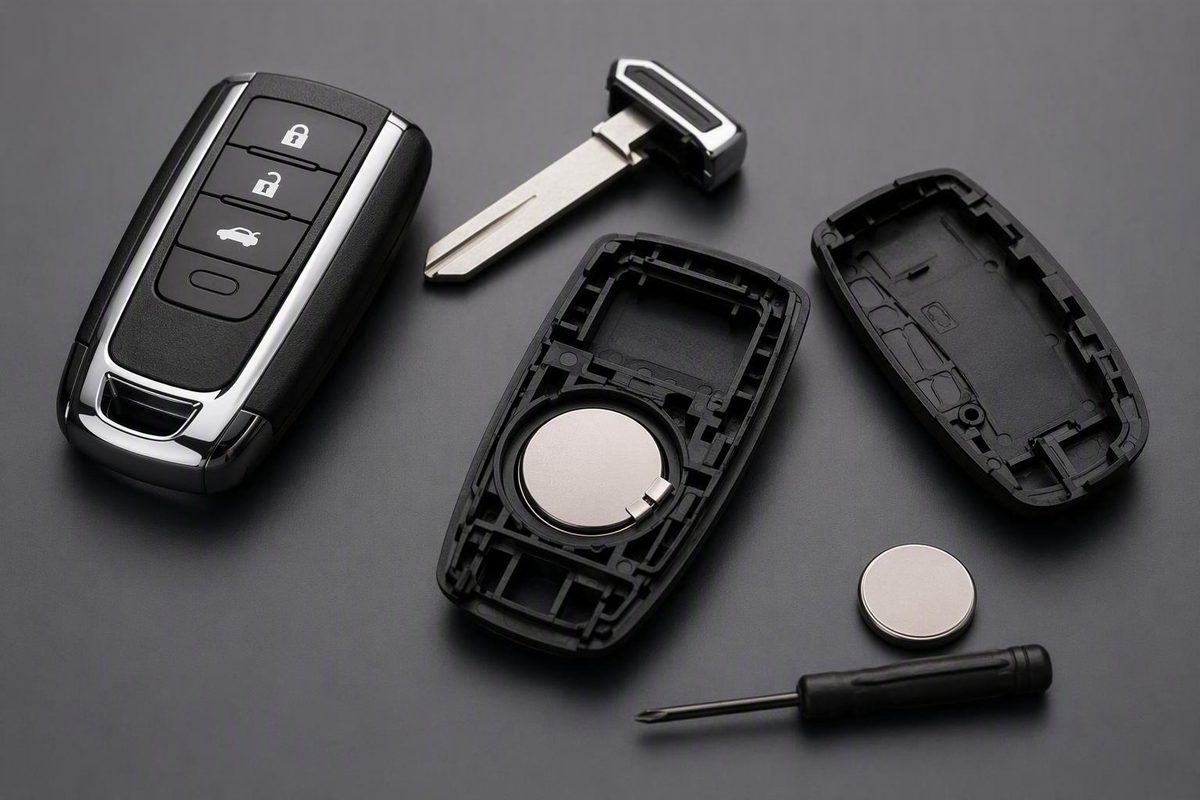
Which coin cell an Acura RDX remote takes, how to open the removable-key smart fob without cracking it, and what to check when a fresh battery changes nothing.
Read the code stamped on the battery already inside your RDX remote and buy that exact cell. On modern Acura smart keys that is usually a CR2032, but Acura’s own dealer guidance separates fob designs, and no source confirms one cell for every RDX year, OEM remote, or aftermarket copy. If the remote has a release button and a removable emergency key, pull the key, pry only at the slot it exposes, photograph the old cell, fit the identical cell the same way up, snap the case shut, and test every button. Nothing in the Acura guidance calls for reprogramming after a plain battery change in a remote that already works with the car.
Pick your fob design and type the code on the old cell; the verdict updates beside the controls.
Which Cell and Which Steps Apply to Your RDX Remote
- Battery to buy
- Unknown until you read it. Open the case and copy the full code on the installed cell. CR2032 is common on modern Acura smart keys but is not confirmed for every RDX remote.
- How to open it
- Pick the fob design above.
- Next step
- Photograph the old cell and its + side before lifting it out. Do not lever on the circuit board.
Sources: Acura 2023 RDX keyless-access guide (interference, ~2-year cell life estimate); Acura dealer smart-key guidance (CR2032, design varies); one seller spec for a 2025 RDX Driver 1 aftermarket remote. No universal RDX spec exists.
Read the Installed Battery Before You Buy One
Battery size, cell count, housing design, and opening method vary by remote type, so the RDX badge alone does not tell you what to buy. Acura dealership guidance names CR2032 for modern smart keys while distinguishing between fob designs, and it does not set one specification for every RDX (Acura smart-key guidance).
One retailer lists a CR2032 for its own aftermarket 2025 RDX Driver 1 smart remote. That is the seller’s specification for that remote, not proof that every OEM 2025 RDX fob, or any other RDX remote, uses the same cell (remote-specific specification).
The procedure below applies only if your remote:
- Has a release button and a removable emergency metal key
- Shows a molded slot or divot once the key is out
- Splits as a two-piece smart-key housing
- Holds a single coin cell, not two
| What you have | What to do |
|---|---|
| Matching removable-key smart fob | Follow the steps below |
| Flip key or visibly different case | Find instructions for that exact design |
| Aftermarket fob | Use the seller’s or manufacturer’s spec |
| Two-cell layout | Do not assume the single-cell steps apply |
The most reliable identification is to open the matching housing, read the complete code on the installed cell, and buy an identical one. Owner documentation for your model year or an Acura parts counter can also identify the cell from the vehicle and remote details.
Reduced range, intermittent response, and repeated presses point toward a weak cell but do not prove it. Radio interference, nearby wireless devices, and metal touching or covering the remote produce the same symptoms, which is why the troubleshooting section below matters as much as the swap.
Opening a Removable-Key RDX Smart Fob
You need the replacement cell matching the code on the old one, the fob’s built-in metal key, and a small flat-head screwdriver only if the housing has a designated screwdriver slot. Work on a clean, well-lit surface where you can see the clips and the battery holder.
-
Remove the emergency key. Press the release button or tab and pull the metal key out of the remote.
-
Find the intended opening point. Look at the area the key was covering for a molded slot or divot. Depending on the design, the key goes in and twists there, or a small flat-head goes in the designated slot.
-
Separate the housing gently. Insert the key or screwdriver only at that point and apply light twisting pressure. Stop if the case resists strongly, starts to bend, or looks materially different from this design. Do not run a screwdriver along the seam or drive it deep into the case.
-
Photograph the installed battery. Before lifting it, take a clear shot showing the full code and which face is up. Note where the positive (+) side sits.
-
Lift the old cell out. Use a fingernail or a small flat tool at the holder’s access point. Do not lever against the circuit board or bend the contacts. Acura’s 2023 RDX documentation permits taking the remote apart for a battery change but advises against any further disassembly.
-
Fit the identical cell the same way up. General Acura smart-key instructions put the positive side up or outward, but the old cell’s position and the holder’s polarity markings take precedence; the arrangement is not established for every RDX fob design (documented smart-key opening and polarity steps).
-
Check the fit and close the case. Confirm the cell lies flat under its retaining points and that the contacts and other visible parts have not moved. Align the halves and press around the perimeter until the clips seat. Push the emergency key back in until it clicks.
If the case will not close without force, reopen it and check the battery seating and alignment. Squeezing harder cracks clips.
Test Every Function, and Skip Programming Sequences
Stand near the RDX and test each function fitted to your car: lock, unlock, tailgate release, passive or walk-up entry, vehicle recognition and starting, and remote start if equipped. One working lock command does not confirm that passive entry, the tailgate, or start recognition are also fine.
The available RDX and Acura guidance does not establish that an ordinary battery change requires programming or synchronization. The seller of the aftermarket 2025 RDX Driver 1 remote does say its complete replacement remote needs professional programming, but that applies to pairing a new remote to the car, not to changing the cell in one that is already paired (seller’s product and programming information).
Do not run a generic ignition-cycle programming sequence after a routine swap. No such sequence is established here for any particular RDX year, ignition type, or smart-key system, and it will not fix a seating or polarity mistake.
If the fob stays unresponsive, reopen it and check, in order:
- The replacement code exactly matches the old cell.
- The polarity matches your photograph and the holder markings.
- The cell sits flat beneath the retaining points.
- The contacts touch the cell and have not been bent or displaced.
- The housing is aligned and fully closed.
When a Fresh Battery Does Not Fix It
Eliminate causes in this sequence: confirm the cell is fresh, correctly matched, and correctly oriented; inspect its seating and the contacts; test away from strong transmitters, electronics, wireless devices, and large metal objects; compare against the spare fob; then consider physical damage to the remote or a vehicle-side receiver fault.
For the 2023 RDX, Acura says strong nearby radio transmissions can inhibit or destabilize starting, locking, unlocking, and tailgate operation. Carrying the remote beside a phone, laptop, telecommunications equipment, or another wireless device can do the same, as can metal touching or covering the remote. The same document estimates remote-battery life at about two years but says actual life varies with use and exposure to strong radio waves (Acura’s 2023 RDX keyless-access guidance).
That two-year figure is an estimate for the 2023 RDX, not a replacement interval for every model year. Replace the cell when the remote’s behavior says so, using the correct model-specific code.
The spare fob narrows the fault fast:
| Result | Likely cause |
|---|---|
| Spare works in the same spot | The first remote |
| Both fail only in one location | Interference |
| Both fail in several locations | Vehicle receiver or another vehicle-side part |
Acura also advises keeping the 2023 RDX key away from liquids, dust, sand, high temperature, high humidity, drops, and heavy objects. Arrange dealer or qualified automotive-key inspection if a correctly installed cell and the interference checks do not restore operation, especially when the housing is cracked, the contacts are bent, the remote has been wet or dropped, or internal parts look damaged.
Getting In and Starting With a Dead Fob
For the 2023 RDX, Acura documents using the built-in mechanical key when a weak remote battery disables power locking or unlocking: press the release button, pull the key from the remote, and work the door lock with it. Afterward, push the key back into the remote until it clicks.
Starting is more model-dependent. Dealership guidance for many Acura vehicles says to hold the Acura-logo side of the fob against the engine start/stop button and follow the vehicle’s prompts. That is general Acura guidance, not confirmation for every RDX year or remote design (dealership’s dead-fob instructions). Verify the dead-fob starting procedure in the owner’s manual for your exact model year before you rely on it.
The working rule: identify the fob before buying a cell, match the code and polarity of the installed one, use the opening steps only on a matching removable-key housing, and test every function after reassembly. If it still fails, check the contacts, the surroundings, and the spare fob before booking model-appropriate diagnosis.