
Chevy Malibu Key Fob Battery: Match the Opening Method to Your Remote
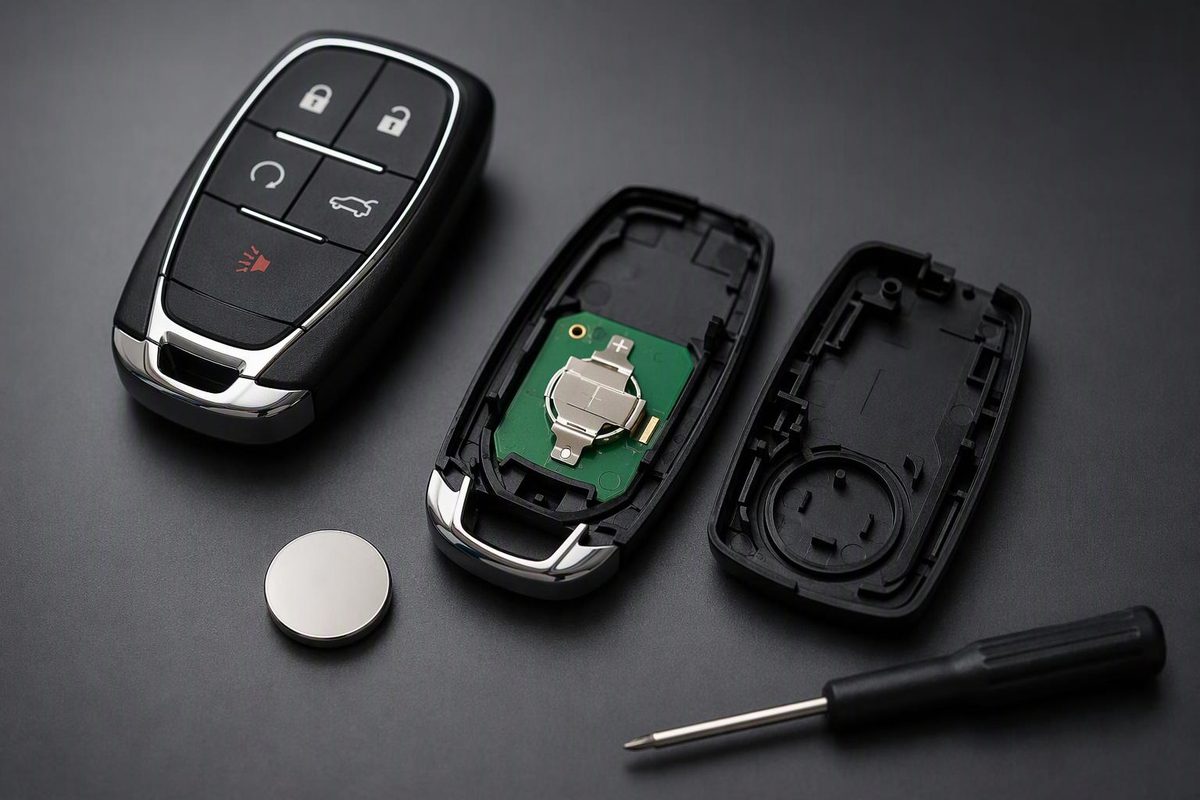
Chevy Malibu manuals specify CR2032 batteries, but opening methods differ. Match your fob, check polarity, replace the cell, and test before programming.
CR2032 is the replacement battery specified in Chevrolet’s 2012, 2015, 2017, 2022 and 2025 Malibu owner’s manuals. The important difference is how you open the remote—not just which battery you buy. For example, the 2017 manual says to open near the key slot, while the 2025 manual explicitly says not to use the key slot. 2017 manual, pp. 37–38; 2025 manual, pp. 12–14
Match your model year and physical fob to the instructions below. These are documented examples, not a year-by-year fitment list. If you have an aftermarket remote, an unfamiliar case, or a different battery code inside, stop and verify that remote’s specification rather than forcing these steps.
Before opening the fob
Have a fresh CR2032 ready, along with a thin flat opening tool if your procedure requires one. Photograph the installed battery’s orientation before removing it.
Reduced remote range is a reason to check the battery, but distance and blocked signals can also affect operation. A dashboard message such as REPLACE BATTERY IN REMOTE KEY is a more direct replacement prompt. Chevrolet’s 2017 manual, pp. 32, 37
Work away from children and keep both new and used coin cells out of reach. Swallowing one can cause severe internal burns; seek immediate medical attention if that happens. Avoid touching the fob’s circuitry, which can be damaged by static electricity. Chevrolet’s 2025 manual, pp. 12–13
Separate remote with a side notch: documented for 2012
For the original remote described in the 2012 Malibu manual:
- Insert a flat, thin object into the notch on the side and separate the transmitter.
- Remove the old battery. Chevrolet says not to use a metal object for this step.
- Install a CR2032 with the positive (+) side facing up.
- Snap the transmitter back together.
These are the instructions in Chevrolet’s 2012 manual, pp. 2-4–2-5. Do not apply the side-notch method to a case without that opening point.
Flip-key remote with a removable battery cover: documented for 2015
For the 2015 Malibu’s folding-key design, remove the battery cover rather than splitting the entire case:
- Press the release button to extend the key blade.
- Pry the battery cover off with a finger.
- Push the battery and slide it toward the key blade to remove it.
- Insert a CR2032, positive side up, and press it down until held in place.
- Snap the battery cover back on.
The procedure comes from Chevrolet’s 2015 manual, p. 2-9.
Removable-key smart fob: check the opening point
These fobs contain a mechanical key that pulls out after you press its release button. Similar appearance does not guarantee the same opening method.
2017 Malibu instructions
- Press the button near the bottom of the fob and pull out the key.
- Separate the case halves with a flat tool inserted into the area near the key slot.
- Push the battery and slide it toward the bottom of the fob.
- Install a CR2032 with the positive side facing the back cover. Press it down until secured.
- Snap the cover back on and return the key.
See Chevrolet’s 2017 manual, p. 38.
2025 Malibu instructions
- Press the release button near the bottom and pull out the mechanical key.
- Insert a flat tool into the bottom center of the fob and separate the halves. Do not use the key slot.
- Push the battery and slide it toward the bottom. Do not use a metal object to remove it.
- Fit a CR2032 with the positive side facing the back cover, pressing it down until secured.
- Make sure the silicone mat has no gaps or wrinkles.
- Place the fob button-side down on a hard surface and press the other half straight down to close it.
- Reinsert the key.
Follow Chevrolet’s 2025 manual, pp. 13–14. The 2022 manual, p. 13 also specifies a bottom-center opening and positive side toward the back cover. For another year, use its own manual to resolve the opening point.
Test before trying a reset
With the vehicle off and the key in your hand—not in the ignition—test lock and unlock near the vehicle, then check trunk release and keyless entry if equipped. If the fob fails immediately after the swap, recheck the battery code, polarity, seating and case closure. Compare with your spare remote if available.
Do not begin a programming sequence just because you replaced the battery. Chevrolet’s cited battery procedures end with reassembly; programming a new or replacement transmitter is a separate task. If the checks above do not restore operation, use our Chevy Malibu key-fob troubleshooting guide for further checks and model-specific emergency-entry and backup-start instructions, or have a dealer or qualified technician check the fob and vehicle.