
Choose the Right Battery and Opening Method for Your Trax
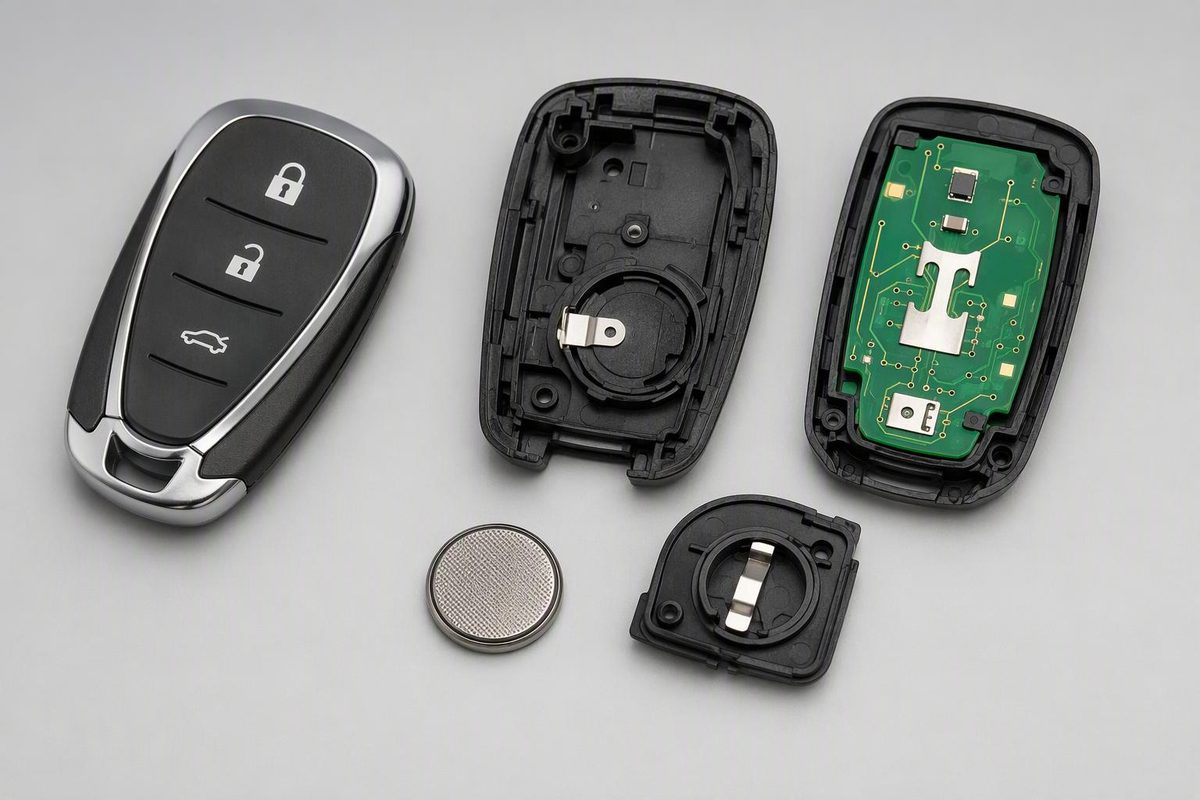
Match your Chevy Trax remote to its documented CR2032 replacement steps, check battery polarity, and learn what to do if the fob still will not work.
The Chevy Trax key fob battery is a CR2032 for the factory remote designs documented here. Chevrolet’s U.S. 2015, 2022, and 2024–2026 manuals specify that cell, but the opening method depends on the remote: a separate rear cover, a split-case ignition-key remote, or a push-button-start fob with a removable emergency key. Match the housing before opening it; these examples do not establish the battery or procedure for every year, market, or aftermarket remote.
Select the housing that matches your remote; check the opening point and battery orientation beside it.
Trax Battery and Opening Match
Match the housing to your manual’s illustration, not just the buttons.
Battery: — until matched
Check your model-year manual or the replacement remote’s instructions before opening.
The documented designs below use CR2032; an unmatched remote is not confirmed.
Do not force the case or assume a year range.
Documented Designs and Polarity
| Design / example year | Opening point | CR2032 (+) side |
|---|---|---|
| Rear-cover flip key 2015 | Extend blade; lift rear cover with a finger | Up |
| Split-case ignition key 2022, 2024–2026 | Flat tool in case recess | Up |
| Removable-key smart fob 2022, 2024–2026 | Remove key; flat tool near key slot | Facing back cover |
For 2022 split-case and smart designs, check the silicone mat for gaps or wrinkles before closing. Follow the matching steps below.
Source: Chevrolet U.S. Trax manuals: 2015 p. 2-5; 2022 pp. 11–12, 17–18; 2024 pp. 15, 17–18; 2025 pp. 14, 16–17; 2026 pp. 15, 17–18. Links below.
Match the Remote Before Opening It
Identify your model year and whether you turn a key in the ignition or use push-button start. Do not choose the procedure solely by button count. Before removing the old cell, photograph its orientation and read its full code.
The documented examples are a separate rear-cover flip key for 2015, and both split-case ignition-key and removable-key smart remotes for 2022 and 2024–2026. These are examples from specific manuals, not universal year ranges.
The opening points and polarity appear in these battery-replacement sections:
| U.S. Trax Manual | Battery-Replacement Pages |
|---|---|
| 2015 | 2-5 |
| 2022 | 11–12 and 17–18 |
| 2024 | 15 and 17–18 |
| 2025 | 14 and 16–17 |
| 2026 | 15 and 17–18 |
For another year or market, use Chevrolet’s Owner’s Manual finder. If a replacement or aftermarket remote does not match the illustrations, check its own instructions rather than forcing it open.
Replace the CR2032 Without Damaging the Housing
Work on a clean surface with a fresh matching battery and, where needed, a small flat tool. Avoid touching the circuit board: Chevrolet warns that static electricity can damage it. The 2022 manual’s replacement precautions also call for the correct battery type and proper case reassembly.
Keep new and used coin cells away from children. A swallowed battery requires immediate medical attention.
Separate Rear-Cover Flip Key: Lift Only the Battery Cover
For the design shown in the 2015 manual:
- Press the release button to extend the key blade.
- Pry open the rear battery cover with a finger.
- Push the old battery and slide it toward the key blade to remove it.
- Install a CR2032 with the positive (+) side up, pressing it into its holder.
- Snap the cover back on.
Do not split the whole housing when the intended access is a separate battery cover.
Split-Case Ignition-Key Remote: Use the Case Recess
For the design illustrated in the 2022 manual:
- Insert a flat tool into the intended case recess and gently separate the halves.
- Use a small tool to push the battery toward the top of the transmitter and remove it.
- Fit a CR2032 positive (+) side up and press it into place.
- Check that the silicone button mat has no gaps or wrinkles.
- Place the button side down on a hard surface and press the other half straight down to close it.
If the case will not sit flush, reopen it and check alignment rather than pressing harder.
The 2024, 2025, and 2026 manuals use the same opening method, removal direction, and polarity. Their final instruction is to snap the battery cover back on; they do not prescribe the 2022 silicone-mat steps.
Removable-Key Smart Fob: Open Near the Key Slot
For the push-button-start design:
- Press the side release button and pull out the emergency key.
- Insert a flat tool near the key slot and gently separate the case halves.
- Push the battery and slide it toward the bottom of the transmitter.
- Install a CR2032 with the positive (+) side facing the back cover, pressing it into its holder.
- Reassemble the cover and reinsert the key.
On the 2022 design, first check the silicone mat for gaps or wrinkles and close the halves straight together. These steps follow the 2022 smart-fob instructions; the 2024–2026 manuals document the matching opening method and battery orientation.
Test the Remote Before Attempting a Relearn
Test lock and unlock near the vehicle, keeping the key outside so you do not lock it in. On ignition-key models, remove the key from the ignition first: the 2026 manual says the remote buttons do not operate while it is inserted.
If the remote still fails, recheck the battery code, polarity, seating, and case alignment. Try the spare remote and repeat the test in another location. Chevrolet’s 2026 troubleshooting guidance identifies distance and signal obstruction as checks before service.
If locking works but remote start does not, check your model-year remote-start conditions. The 2026 manual identifies an open hood or an emission-control fault as conditions that can prevent remote starting independently of the fob battery.
Chevrolet’s cited battery-replacement procedures end with reassembly, not a programming sequence. Do not start a timed relearn simply because you changed the cell. A new replacement fob is a separate programming task; the 2026 programming guidance includes procedures that erase previously recognized keys. Persistent failure warrants diagnosis by a dealer or qualified technician.
Use the Model-Year Backup Start Procedure If the Cell Dies
The mechanical key provides driver-door access. That is not the same function as remote unlocking or electronic start authorization. The 2026 manual includes instructions for removing the cap covering the driver-door key cylinder.
For a 2022 push-button-start Trax, Chevrolet directs you to place the transmitter in the front cupholder, then press the brake and ENGINE START/STOP with the transmission in Park or Neutral.
For other years, follow the illustrated backup-key pocket in your own manual. The 2026 instructions specify the remote-key pocket with the buttons facing the front of the vehicle—not placement anywhere in the console.