
Chevy Silverado Key Fob Battery Replacement: Identify the Fob First
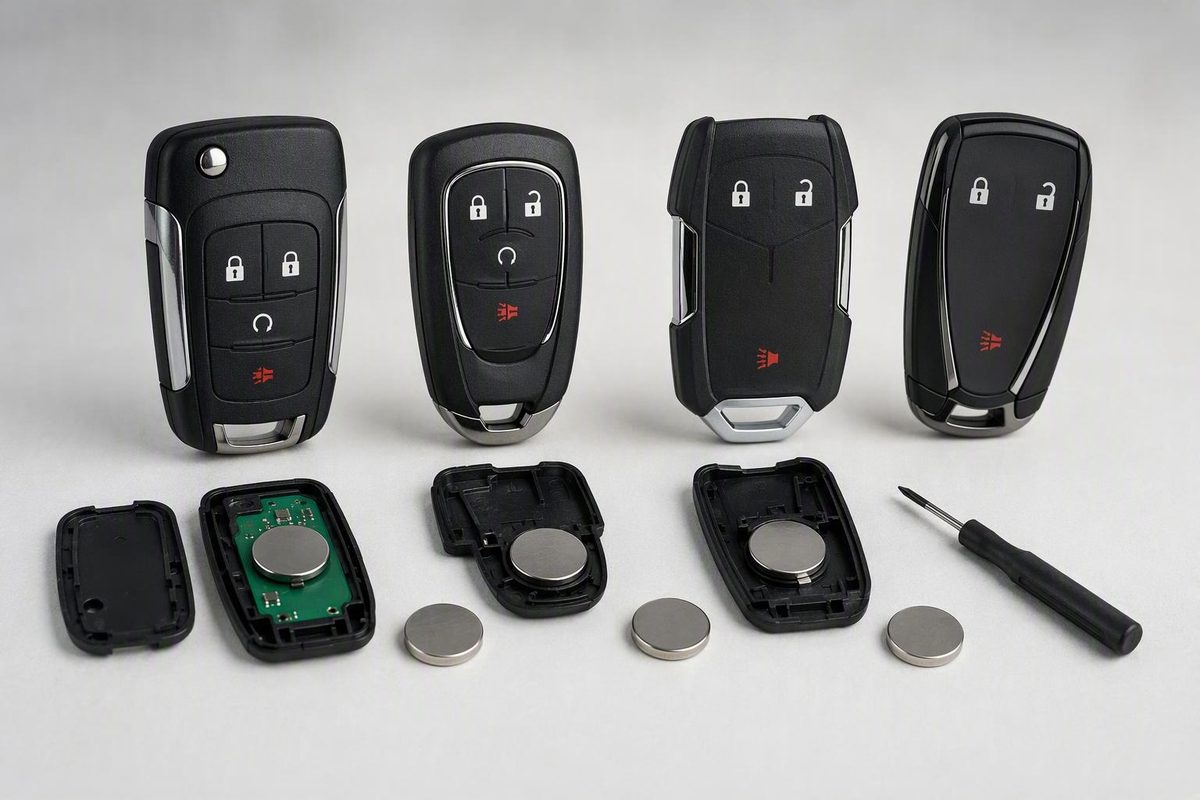
Identify your Silverado key fob, verify its coin-cell code, replace the battery safely, and troubleshoot a remote that still does not work.
A CR2032 3-volt coin cell is specified for several Silverado remotes, including the key-access and keyless-access transmitters covered by Chevrolet’s 2020 manual. But Silverado fobs have changed over the years, so identify the physical remote and check its installed battery before buying a replacement. Chevrolet’s manuals also note that equipment can vary within a model year.
Confirm the battery before opening the package
Use these checks in order:
- Find the truck’s model year from the VIN label or registration.
- Identify whether the truck has a metal ignition key or push-button start.
- Compare the actual fob with the illustrations in the year-specific Owner’s Manual.
- Once the case is open, read the complete code stamped on the old cell and record which side faces outward.
Chevrolet provides downloadable manuals and says manuals for 2008-and-newer vehicles are also available through the myChevrolet app’s Help Center (Chevrolet manuals and guides). This matters because a 2008-style separate remote, a 2017 remote and a 2020-or-newer smart fob do not all open the same way. For broader design identification, see our Chevy key-fob battery guide.
Which Silverado fob do you have?
Separate button remote with a separate ignition key
This is common on older Silverado trucks, including configurations covered by the 2008 Silverado Owner’s Manual and 2017 Silverado Owner’s Manual. The remote is a self-contained plastic unit without a key blade hidden inside it.
- Work over a clean table so the buttons and internal pieces cannot fall away.
- Locate the notch or intended opening point along the case seam.
- Insert a small flat tool only far enough to engage the notch, then twist gently to separate the halves. Do not force the tool toward the circuit board.
- Note the old cell’s full number and polarity before removing it.
- Fit an exact replacement in the same orientation.
- Align the case halves and press around the edge until every clip closes.
Key-access transmitter for a truck with a metal ignition key
Some newer Silverados still use a keyed ignition. Chevrolet’s 2020 manual gives this transmitter its own battery-replacement procedure, separate from the push-button-start fob. It specifies a CR2032 or equivalent and warns against touching the transmitter circuitry because static electricity can damage it (2020 Silverado Owner’s Manual).
Open the housing at its designated center seam with a thin, flat tool. Lift the old cell without scraping the electronics, install the CR2032 in the documented orientation, and snap the housing together. If the installed cell or the illustration in your exact manual disagrees with this description, follow the fob and manual rather than a generic procedure.
Push-button-start smart fob with a removable mechanical key
This fob has a small release button and an emergency key concealed inside. It is the relevant design for many newer Silverado 1500 configurations.
- Press the side button and pull out the mechanical key. Never pull the key out without pressing its release; Chevrolet specifically gives that instruction in the 2020 manual.
- Use the opening point exposed by the removed key to separate the case. Apply light twisting pressure rather than driving the tool deep inside.
- Photograph the battery before removal.
- Remove it without prying against the circuit board or bending the contacts.
- Install the exact cell shown in the fob or model-year manual, matching the original polarity. The 2020 Silverado procedure specifies a CR2032 with its positive side toward the back cover (2020 Silverado Owner’s Manual).
- Press the case together evenly and reinstall the mechanical key.
The current-generation housing may look similar without being identical. Check the instructions for the exact truck; the 2024 Silverado 1500 Owner’s Manual, for example, identifies the remote-key section under “Keys, Doors, and Windows” and shows the removable-key design.
Test before considering programming
Stand near the truck and test every supported button: lock, unlock, panic, tailgate and remote start. On a proximity-equipped truck, also check passive entry and normal starting.
If nothing works, reopen the fob and check these points:
- The battery code exactly matches the removed cell.
- The positive and negative sides are not reversed.
- The cell is fully under its retaining tabs.
- The contacts are not flattened, contaminated or displaced.
- The rubber button pad and case are seated correctly.
- A protective sticker has not been left on the new battery.
Reduced range is not always a battery problem. Chevrolet advises checking distance, signal-blocking objects and then the transmitter battery; persistent failure calls for dealer or qualified-technician service (2020 Silverado Owner’s Manual). Work through those physical checks before attempting any programming procedure. If the problem began immediately after the swap, use our post-replacement troubleshooting sequence.
If the smart-fob battery is already dead
The mechanical key provides emergency entry, while the immobilizer/start function is separate from the remote buttons. Chevrolet says to remove the concealed key, uncover the driver-door lock cylinder and unlock the door mechanically. To start a compatible push-button vehicle, place the fob in the truck’s designated transmitter pocket, press the brake and push the Start/Stop button; the pocket location varies, so check the exact manual (Chevrolet Keyless Open and Start support).
Keep loose coin cells away from children. Chevrolet warns that a swallowed fob battery can cause internal burns and requires immediate medical attention (2020 Silverado Owner’s Manual).