
Find Your Maverick’s Door Code Without Mistaking Retrieval for a Reset
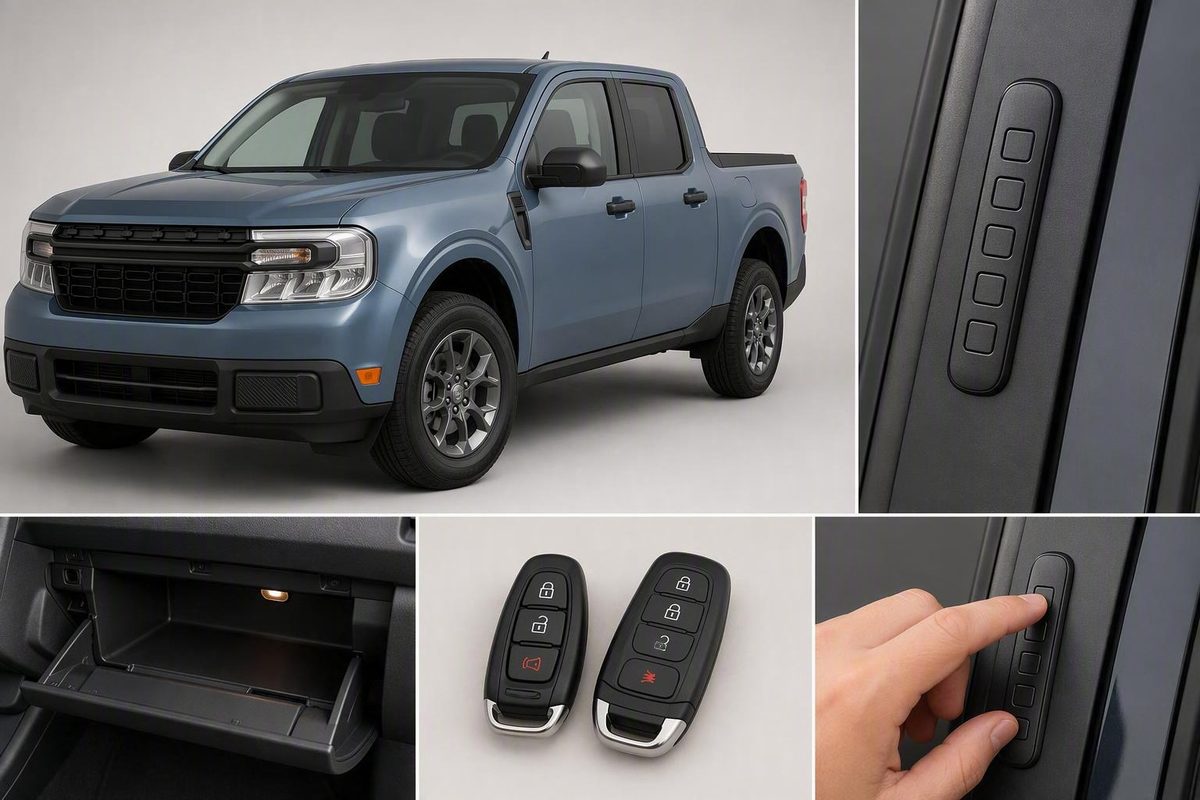
Identify the keypad type, check the glovebox card, then use the supported two-key or two-fob method; personal codes do not replace the factory code.
For a Ford Maverick with a factory-integrated SecuriCode keypad, first check the owner’s wallet card in the glovebox for the factory-set five-digit code. If the card is missing, Ford’s general procedure may display the existing code using two programmed ignition keys or two programmed Intelligent Access fobs. If you have only one programmed key or fob, contact a Ford dealer.
These procedures are not established for every dealer-installed accessory keypad. If you are unsure which keypad your Maverick has, check its accessory documentation or ask the installing dealer before entering codes or attempting retrieval.
Retrieving the factory code is not a reset. Adding or erasing personal codes does not replace the permanent factory code.
Quick answer: Choose the right code-recovery path
| What you have | Best next step | Expected result |
|---|---|---|
| Owner’s wallet card | Check the card in the glovebox | Find the factory-set five-digit code |
| Two programmed ignition keys | Use Ford’s keyed-ignition display procedure if supported by your manual | Code appears briefly in the information display |
| Two programmed push-button fobs | Locate the backup slot, then use Ford’s two-fob procedure if supported | Code appears briefly in the information display |
| Only one programmed key or fob | Contact a Ford dealer | Dealer may attempt retrieval after confirming ownership |
| Dealer-installed accessory keypad | Check its documentation or contact the installer | Accessory-specific instructions |
Ford says the wallet card in the glovebox contains the factory code. If it is missing, Ford’s general retrieval instructions require both programmed keys or fobs and direct owners with only one to a dealer. Match the procedure to the vehicle’s key type and verify it against the model-year Maverick owner’s manual. Ford’s factory-code retrieval guide covers both supported key types.
Treat the factory code like a physical key. Do not post a photo of the wallet card, place the code in a publicly visible note, or share it unnecessarily. Anyone who has the code and can reach the compatible keypad may be able to unlock the truck.
How to display the code with two ignition keys
This is Ford’s general procedure for a vehicle with a traditional keyed ignition and two programmed keys. Use it on a Maverick only when its model-year documentation supports the process.
Before starting:
- Park in a safe, well-ventilated place.
- Switch the vehicle off.
- Close every door.
- Have both programmed keys ready.
- Do not press the brake pedal.
- Read the complete sequence before starting; Ford says it must be completed within 30 seconds.
Then:
- Insert the first programmed key into the ignition.
- Turn it to ON, the last position before engine start, without starting the engine.
- Wait four seconds.
- Remove the first key.
- Insert the second programmed key.
- Turn it to ON without starting the engine.
- Wait four seconds.
- Watch the information display for the factory-set five-digit code.
The code appears only briefly and may follow other warning messages. These preparation, timing, and display details come from Ford’s factory-code retrieval instructions linked above.
There is one documented Maverick-specific example: in a JustAnswer customer report involving a 2023 Maverick, an owner with traditional ignition and two programmed keys said cycling the keys displayed a five-digit code in the instrument-cluster message center, and that the code unlocked the doors. This is one customer-reported success—not proof that the procedure works on every model year, ignition system, or keypad configuration.
Record the code privately as soon as it appears. If nothing displays, confirm that both keys are programmed, check the model-year manual, and retry the exact sequence once. Do not substitute procedures from unrelated Ford models or remove trim to search for a module label.
Push-button start requires two fobs and the backup slot
Ford’s general push-button procedure requires two programmed Intelligent Access fobs and the vehicle’s intelligent-key backup slot. Find the slot using the owner’s manual for your exact model year; its Maverick location is not established for every configuration in the available evidence.
With the doors closed and the vehicle off:
- Place the first programmed fob in the backup slot with its buttons facing down.
- Press Start/Stop once without pressing the brake.
- Wait four seconds.
-
Press Start/Stop again, then remove the first fob.
-
Press Start/Stop once without pressing the brake.
- Wait four seconds.
- Press Start/Stop again, then remove the second fob.
- Watch the information display for the factory-set five-digit code.
Ford says to complete the sequence within 30 seconds. The code should appear briefly, potentially after other warning messages. The full sequence, timing, and brake-pedal precaution are supported by Ford’s factory-code retrieval guide cited in the previous section.
These are general Ford Intelligent Access instructions. They do not establish that every push-button Maverick or dealer-installed accessory keypad supports this process, and they do not establish a universal Maverick backup-slot location. Follow the model-year owner’s manual if it differs.
Program a personal five-digit code
Once you have the factory code, you can add a personal code without disabling the factory one.
To program the first personal-code position:
- Enter the factory-set five-digit code on the exterior keypad.
- Press 1-2 within five seconds.
- Enter your chosen five-digit personal code.
- Press 1-2 again to save it.
The doors should lock and unlock to confirm that the code was stored. If that does not happen, restart with the factory code and observe the five-second timing window. Ford’s personal-code programming guide provides this sequence and confirmation.
Ford says SecuriCode can store up to five personal codes through the 1-2, 3-4, 5-6, 7-8, and 9-0 keypad positions. The supplied Ford instructions give the full procedure for saving with 1-2 but do not detail the selection sequence for the other positions, so consult the model-year owner’s manual before assigning additional codes. Ford also advises against five repeated digits or five sequential digits.
A personal code is an additional credential, not a replacement for the factory code. Store the factory code securely even if you intend to use only the personal one.
These are Ford SecuriCode instructions. A dealer-installed accessory keypad may use different codes, memory positions, or confirmation steps, so check its documentation before applying this sequence.
Erase personal codes before selling or sharing the truck
Erase saved personal codes when selling the Maverick or withdrawing another driver’s keypad access. The procedure requires the factory code:
- Enter the factory-set five-digit code.
- Press and release 1-2 within five seconds.
- Within the next five seconds, press and hold 1-2 for two seconds.
This removes all personal codes rather than one selected code. Only the permanent factory-set code remains functional afterward, according to Ford’s instructions for erasing personal keypad codes.
If several people use the truck and only one person’s access should end, erase all personal codes and create new ones for the drivers who should retain access.
When to stop and contact a Ford dealer
Contact a Ford dealer when:
- You have only one programmed ignition key or Intelligent Access fob.
- The wallet card is missing and the supported two-key or two-fob route is unavailable or inapplicable.
- The correct two-key or two-fob procedure does not display a code.
- Your model-year manual gives different instructions.
- You cannot determine whether the keypad is factory-integrated or dealer-installed.
For an in-person disclosure request, bring:
- Government-issued photo identification.
- Registration, title, or other documentation showing your name and the vehicle identification number.
Confirm with the dealer beforehand whether it needs the Maverick and both programmed keys or fobs at the appointment.
A dealer may attempt retrieval with diagnostic equipment, but retrieval is not guaranteed and a fee may apply. Ask about charges and required documents before visiting. Ford states these conditions in its factory-code retrieval guidance cited earlier.
Do not remove trim or attempt to access the body control module based on a generic video. The evidence does not establish a safe, Maverick-specific procedure for locating or reading such a label.
Locked out now? Ford directs locked-out owners to Roadside Assistance at 1-800-241-3673, as stated in its factory-code retrieval guide cited above.
Check whether your Maverick has a factory or accessory keypad
Keypad hardware and code retrieval are separate questions. A factory five-digit code cannot operate a truck that lacks a compatible keypad, while the presence of an accessory keypad does not prove that factory SecuriCode retrieval and programming instructions apply.
| Model years | Reported keypad arrangement | Limitation |
|---|---|---|
| 2024–2026 | Dealer-installed option at a reported $230 installed | Accessory procedures may differ |
| 2027 | Reported return as a factory-installed option | No Ford confirmation or price in the supplied report |
Ford Authority reported that the Maverick keypad was a dealer-installed option for the 2024, 2025, and 2026 model years at an installed price of $230. Its August 29, 2026 report said a factory-installed keypad would return for the 2027 Maverick on XL, XLT, Lobo, Lariat, and Tremor trims. The report did not include 2027 pricing, and the available evidence does not include first-party Ford confirmation of that availability or trim list. Read the third-party Maverick keypad availability report.
Before using any procedure, identify the truck’s model year and determine whether its keypad is factory-integrated or dealer-installed. Check the owner’s manual and any accessory documentation supplied with the keypad. Do not assume the reported 2024–2026 price applies to a 2027 factory option, or that factory and accessory keypads retrieve and store codes in the same way.
The safest order is to identify the keypad type, check the glovebox wallet card, use the matching two-key or two-fob procedure only when the vehicle’s documentation supports it, and contact a dealer if you have one programmed key or retrieval fails. The factory code remains active while personal codes are managed separately, and model-year documentation takes priority over general Ford instructions.