
How to Change Your Acadia Key Fob Battery Without Guessing the Size
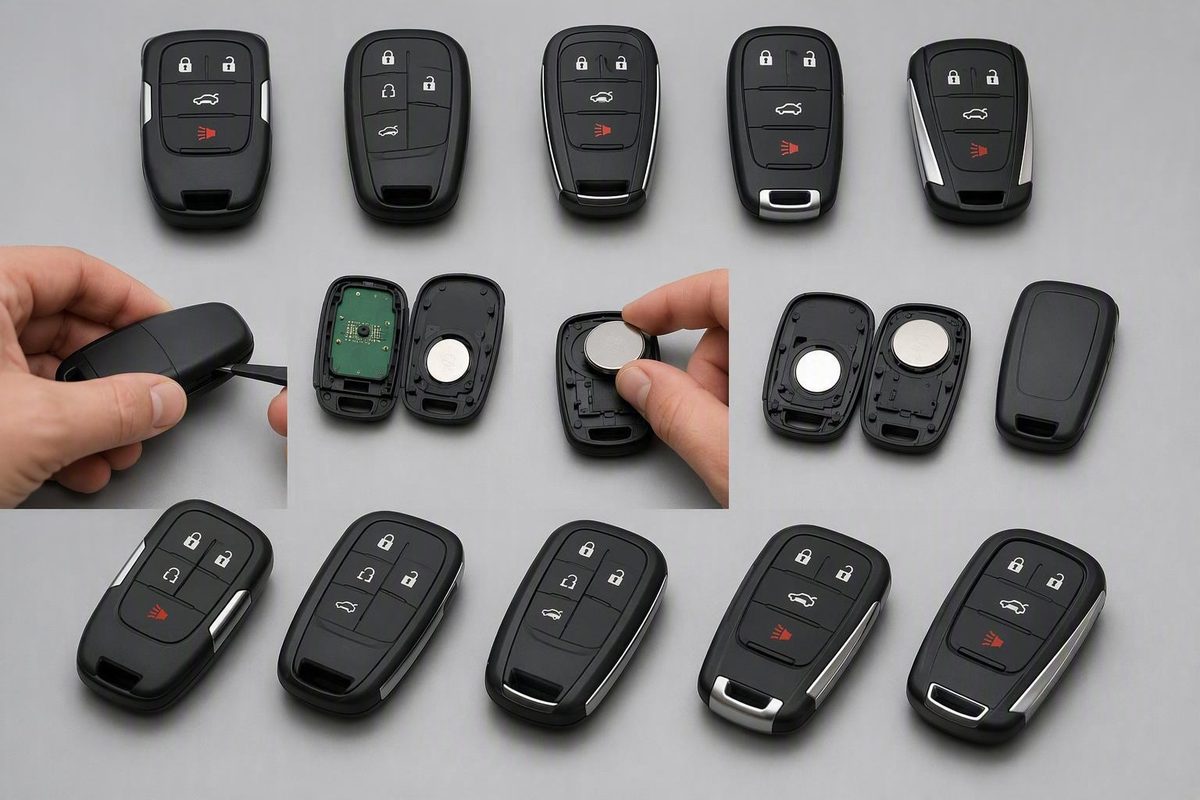
Verify the coin-cell code and polarity, then open, install, reassemble, test, and troubleshoot differing Acadia transmitter designs.
The 2022 GMC Acadia owner’s manual, pages 12–13 specifies a CR2032 or equivalent for the illustrated transmitter, with the positive face toward the rear cover. This verifies the 2022 design; it does not establish compatibility for every Acadia year or aftermarket remote.
Replace the Battery: Verified 2022 Acadia Procedure
Match your transmitter to the manual’s illustrations first:
- Press the release near the bottom and remove the mechanical key.
- Insert a thin, flat object at the housing’s center to release the rear cover.
- Lift out the old cell using a flat, non-metal tool.
- Fit the CR2032 with its positive face toward the rear cover.
- Check that the sealing mat is flat and has no gaps or wrinkles.
- Put the button half face down on a firm surface, then press the other half straight onto it.
- Reinsert the key.
Avoid touching the circuit board. Keep coin cells and the transmitter away from children; swallowing a battery requires immediate medical attention. Follow GMC’s handling and disposal warnings.
For a different transmitter, find its exact model-year instructions before opening it. Photograph the original cell and polarity, and never substitute a thinner battery simply because its diameter matches.
Test the fob after reassembly
Stand near the Acadia and test lock and unlock first. If both respond consistently, increase your distance gradually and repeat the test.
Then test every function fitted to your vehicle and transmitter:
- Panic alarm
- Liftgate release
- Passive entry at the doors and liftgate
- Remote start
- Any other dedicated transmitter button
Inspect the physical assembly as well. The housing should be completely closed, without a raised edge or uneven seam. Each button should move and return normally.
General GMC guidance says battery replacement does not require reprogramming in most cases, but that is not verified for every Acadia model year or transmitter. Follow the exact model-year owner’s manual if it specifies resynchronization or another post-replacement procedure rather than trying an unrelated generic GM sequence. This qualified guidance is described in Cochran Buick GMC’s general GMC battery guide.
If the key fob still does not work: a troubleshooting table
A fresh battery does not prove that the battery is correctly installed or that the transmitter itself is sound. Check the basic installation before paying for a replacement fob or programming.
| Symptom | First checks | Possible next cause |
|---|---|---|
| Total failure after replacement | Verify the exact battery code, polarity, freshness, clean contact surfaces, contact fit, and complete case closure | Damaged controls, failed transmitter electronics, or a vehicle-side fault |
| Intermittent operation | Reseat the battery; inspect contact fit, case alignment, and button movement | Worn or damaged controls or another transmitter fault |
| Range remains short | Test close to the Acadia, then in another location away from obstructions and likely interference | Transmitter fault or vehicle-side receiver problem |
| One function fails | Confirm that lock and unlock work; retry the feature under its normal operating conditions | Button-specific problem, unavailable operating condition, or vehicle-feature fault |
| Passive entry fails but buttons work | Retest with the fob close to another equipped entry point | Passive-entry or broader vehicle-side problem |
For total failure, remove and reinstall the cell once while carefully checking its code and polarity. Make sure it sits fully in the holder and touches the intended contacts. If the contacts appear damaged or displaced, stop rather than reshaping them without transmitter-specific instructions.
For intermittent operation, confirm that the case closes squarely and that every button moves normally.
Move toward transmitter replacement, programming, or vehicle diagnosis only after checking the battery specification, installation, contacts, case closure, and likely interference. Damaged controls, failed transmitter electronics, and vehicle-side receiver faults may require diagnosis by a qualified automotive locksmith, repairer, or GMC dealer.
Getting into the Acadia when the fob battery is dead
A dead transmitter battery does not necessarily prevent access to the Acadia. Many transmitters include a mechanical key, but its release and the vehicle’s concealed door-lock arrangement depend on the specific design.
For the transmitter described in the official 2022 Acadia owner’s manual, press the button near the bottom of the transmitter and pull out the mechanical key.
Do not rely on a universal emergency-start pocket, location, or button sequence. Use the owner’s manual for the exact model year, trim, region, and equipment configuration.
Verify the stamped battery code and original polarity, use only the opening point intended for the transmitter, and test every equipped function after reassembly. If the physical key, housing, or emergency-start arrangement does not match this guide—or a correctly installed battery does not restore operation—consult the exact owner’s manual or seek qualified help.