
Kia Key Fob Not Working After Battery Replacement? Check Before Resetting
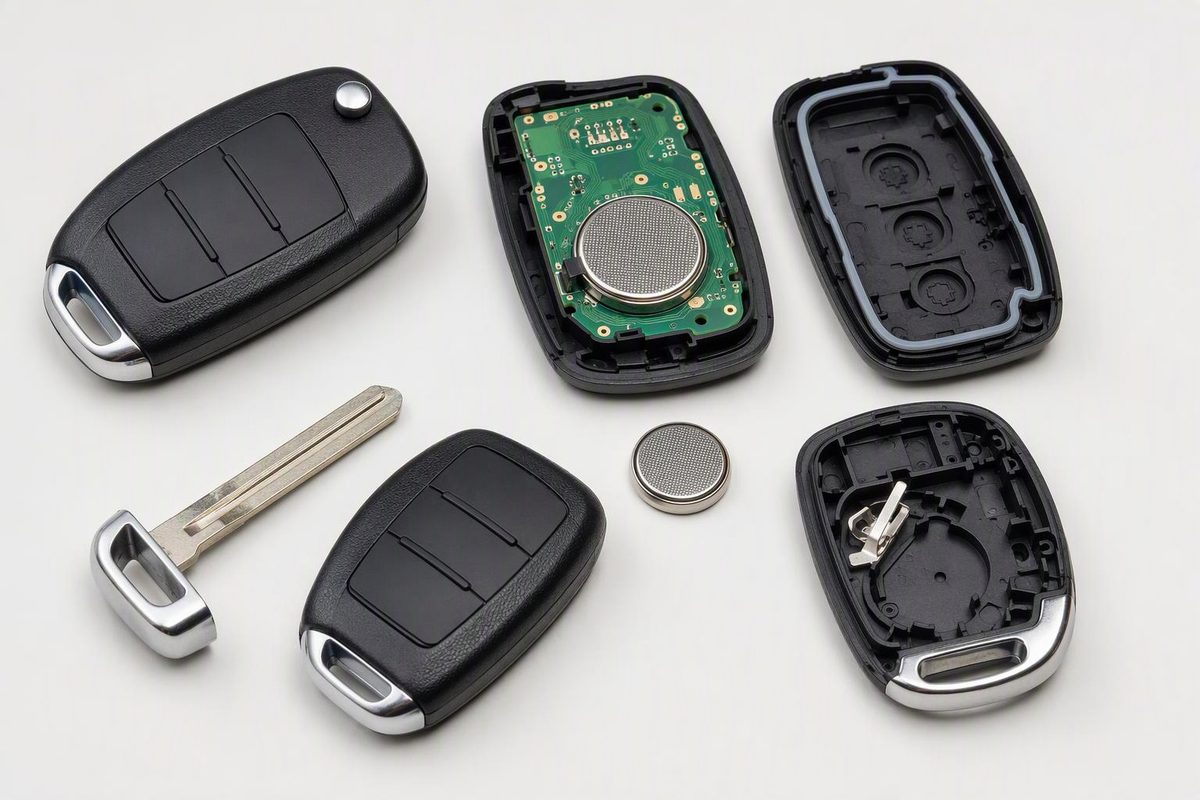
Check your Kia fob’s battery code, polarity and contacts, compare a spare, and separate remote-locking faults from emergency-start problems.
If your Kia key fob stopped working immediately after a battery change, recheck the cell and reassembly before trying a reset or paying for programming. Kia warns that the wrong battery or incorrect polarity can make the key unusable. Its battery-replacement instructions end with reassembly; they do not prescribe a pairing or reset sequence.
First identify your model, year, market and physical key type: a folding ignition key with remote buttons, or a smart key used with push-button starting. An aftermarket fob may also differ from the original. Use the matching owner’s manual—not a procedure based only on the Kia badge.
1. Recheck what changed inside the fob
Work over a clear surface, with coin cells out of children’s reach. Kia warns that swallowing a lithium button battery can cause severe or fatal injuries within two hours. Suspected swallowing or insertion into any part of the body needs immediate medical attention. Then check these items in order:
- Full battery code. Compare the new cell with the correct manual or the old cell if it previously worked. Do not assume every Kia takes CR2032: Kia documents CR2032 in one design and CR2450 in another. These are not interchangeable specifications.
- Polarity. Match the holder markings or the manual’s diagram. Do not apply a universal “positive side up” rule. Kia’s CR2032 instructions above explicitly warn that incorrect polarity can discharge the cell and render the key unusable.
- Seating and contacts. Check that the battery sits fully in its intended holder, with no packaging trapped underneath. Look for a displaced or broken contact, but do not bend terminals or bridge them with foil.
- Case alignment. Make sure the circuit board and button pad are in their intended positions and the cover closes without force. Check that every button moves freely rather than staying pressed.
- A second fresh cell. If the installation looks correct, try another new battery of the verified code. This is a useful comparison before assuming the electronics failed.
For opening guidance, use our Kia key-fob battery replacement guide alongside your matching manual.
Stop here if you find a broken holder, loose component, corrosion or a case that will not close correctly. Further prying is not a programming fix. Kia notes that moisture, static electricity and physical damage can cause fob malfunction.
2. Test the functions separately
Keep an alternate way into the vehicle available before testing the locks. With the vehicle off, any ignition key removed and all doors closed, stand close to the driver’s door and test lock and unlock. Keep the fob separate from your phone and other keys. Kia identifies phones, nearby radio transmitters and signal obstructions as possible causes of remote-operation problems.
If available, test a known-working spare under the same conditions, one key at a time.
| What you observe | Next useful check |
|---|---|
| The spare works; the changed fob does not | Revisit the changed fob’s cell, contacts and assembly. If those checks pass, have that fob tested. |
| Both fobs fail | Check vehicle power and interference before buying a replacement fob. A spare with an unknown battery is not a reliable comparison. |
| Remote buttons work, but handle entry does not | Check the model’s passive-entry procedure and operating conditions; this is not a completely dead remote. |
| The car starts, but remote buttons fail | Treat starting and remote locking as separate results—not proof that every part of the fob works. |
| Only one button fails | Inspect that button’s movement and case alignment before pursuing whole-key programming. |
If operation changes when you separate the fob from your phone or try another location, investigate interference rather than repeatedly replacing batteries.
3. If you are locked out or see “key not detected”
Mechanical entry, remote locking and immobilizer recognition are different functions. A mechanical key can open a lock without proving that the remote electronics work. Where fitted, the immobilizer must recognize the key’s coding before allowing the vehicle’s power system to operate; Kia explains this in its smart-key immobilizer guidance.
For example, the 2023 U.S. Telluride smart-key instructions provide mechanical-key access to the driver’s door. That design supplies its backup mechanical key separately, so do not assume every Kia hides a blade inside the fob. Follow your manual for the lock location and any cover-removal procedure.
On the 2023 U.S. Telluride, Kia documents pressing the ENGINE START/STOP button directly with the smart key, at a right angle, when its battery is weak or the key does not work correctly. This is a backup starting method, not a reset, and should not be generalized to every Kia generation. For this model, apply the parking brake, select P (Park), press the brake pedal fully and leave the accelerator alone, as specified in its normal starting instructions.
If backup starting works but remote locking remains dead, return to the battery and transmitter checks. If interior lights dim or go out when the starter operates, investigate the vehicle battery: Kia lists that as a discharged-battery indication.
4. When to seek testing or programming
Do not use a generic ignition-cycling or lock-button sequence unless your exact Kia manual specifies it. A battery replacement in the existing fob is not the same job as registering a replacement smart key.
Seek service when a verified fresh cell and correct assembly change nothing, or when the car repeatedly fails to recognize the key using its documented backup method. Kia directs owners with repeated immobilizer-recognition failures to a dealer and warns against altering that system.
Ask a Kia dealer or an automotive locksmith equipped for your exact model to test the fob and diagnose recognition before quoting replacement and registration. If registration is required, it is a separate model-specific service—not something established by the battery-change steps above. Bring all available keys and report which functions fail, whether the spare works, and whether backup starting succeeds.