
Replace Your Kia Key Fob Battery Without Guessing the Size
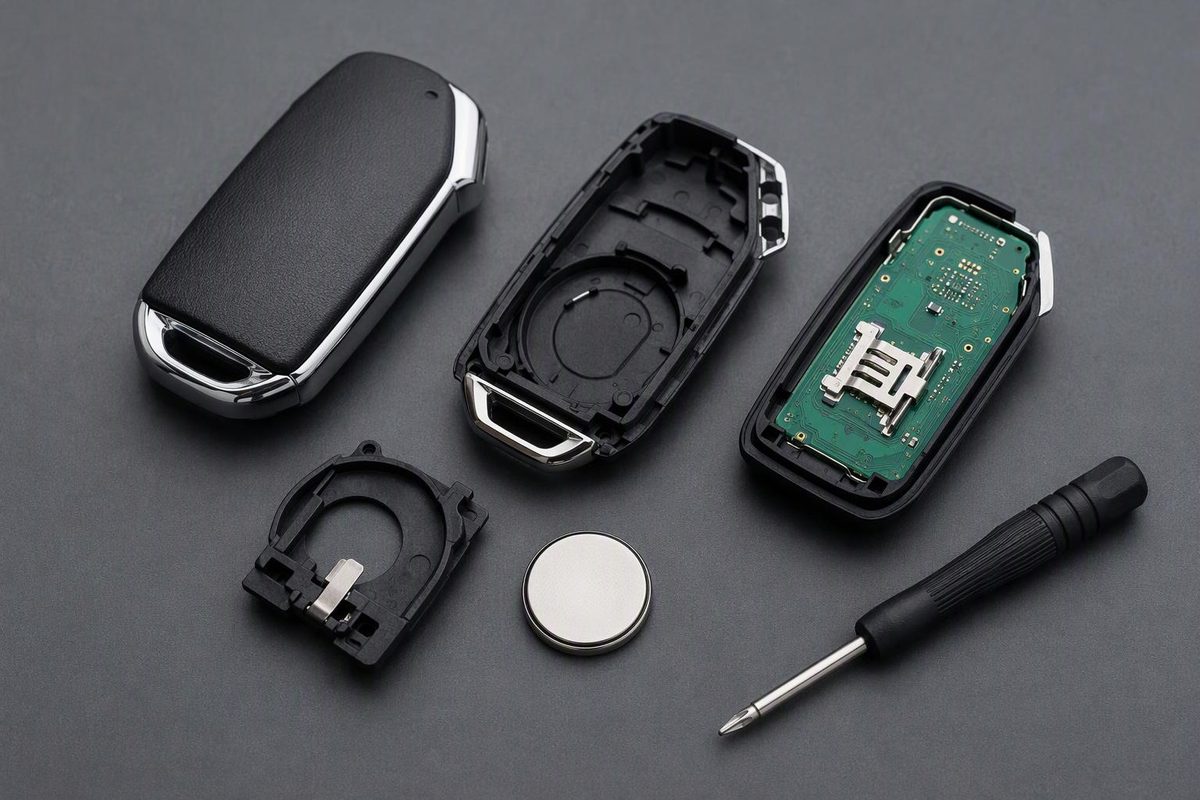
Confirm your Kia fob’s battery code, follow the matching opening method, check polarity, and troubleshoot a remote that still will not work.
There is no single battery size for every Kia key fob. Kia’s 2023 U.S. EV6 smart-key instructions specify CR2032; its 2026 English-language Tasman manual specifies CR2032 for the remote key and CR2450 for the smart key. Buy the battery for your actual fob—not simply one advertised as a “Kia key battery.” (EV6 instructions, Tasman instructions)
The safe sequence is: identify the fob, open the correct cover, record the battery code and polarity, replace the cell, then test before considering programming.
Identify your Kia and key first
Check the model, model year and market in your owner’s manual, then match its key illustration to your remote. A replacement or aftermarket housing may not match the original design.
Distinguish between:
- Folding/flip key: the metal ignition blade folds into the remote body.
- Smart key: used with push-button starting; the documented EV6 design includes a removable mechanical emergency key.
- Other remote designs: if neither description fits, use the exact manual rather than forcing the case apart.
For narrower guidance, see our 2023 Kia Sportage battery guide or Kia Sorento replacement guide.
Have a thin case-opening tool, the correct replacement cell and a clean work surface ready. If your design has a battery-cover screw, you will also need a screwdriver that fits it.
Keep new and used coin cells away from children. Kia warns that swallowing a lithium button battery can cause severe or fatal injuries within two hours. Suspected swallowing or insertion into the body requires immediate medical attention. (Kia battery safety warning)
Open the matching cover and replace the battery
Smart key with a removable mechanical key
For the design documented in Kia’s 2023 U.S. EV6 manual:
- Remove the mechanical key. Operate its release and withdraw the blade.
- Open the rear cover. Follow the manual’s illustration and pry gently. Do not drive the tool deep into the electronics.
- Photograph the installed battery. Record its full code and which side faces outward before removing it. For this documented EV6 fob, Kia specifies CR2032.
- Fit the new cell. Match the holder’s polarity markings and the documented position. Do not assume that every Kia installs positive-side up.
- Reassemble in reverse order. Seat the cover fully and return the mechanical key.
Kia’s procedure is removal of the mechanical key, opening the rear cover, battery replacement and reverse-order assembly. If your housing does not match, stop and find its instructions. (EV6 battery procedure)
Folding key or slot-opening remote
Kia’s online India-market Seltos manual documents a different opening sequence:
- Insert a slim tool into the slot and gently pry open the key cover.
- On the folding-key version, loosen the retaining screw and remove the separate battery cover.
- Replace the battery with a CR2032 in the correct position, then reassemble in reverse order.
Photograph the cell’s code and orientation before removal. Use this sequence only if your fob matches the manual; do not try to pry past a screw. (Seltos folding-key procedure)
Stop if the cover needs substantial force, the holder is broken, or the old cell conflicts with the exact manual. Resolve the mismatch before installing anything. Kia warns that the wrong battery can cause malfunction and recommends dealer help when the procedure is unclear. Dispose of the old cell according to local regulations. (Kia replacement precautions)
Test before attempting a reset
Keep an alternate way into the vehicle available. After reassembly, test lock and unlock near the car, then normal starting and proximity entry if equipped. Test the functions separately: remote locking, mechanical entry and electronic starting authorization are not the same thing.
A battery swap in the original working key normally does not require reprogramming. YOUCANIC’s Kia replacement guide states that no further programming is required. Kia’s documented EV6 battery procedure ends with reassembly and gives no pairing step. Do not begin with a generic ignition-cycling “reset.” (YOUCANIC guide, Kia procedure)
If the fob still fails:
- Recheck the installation: full cell code, polarity, seating and cover closure. Try another new cell of the correct specification before condemning the remote.
- Separate it from your phone and other keys. Kia identifies phones, radio transmitters and nearby smart keys as possible interference sources. (Smart-key precautions)
- Compare the spare. If the spare works, focus on the affected fob. If both fail, investigate the vehicle side too. Telluride owners can follow our fob-versus-12-volt-battery checks.
- Escalate persistent starting-recognition faults. Kia’s EV6 manual recommends dealer attention when the immobilizer repeatedly fails to recognize the key’s coding. A lost or replacement smart key is a separate issue: the EV6 manual directs owners with a lost smart key to an authorized Kia dealer, not a battery-change or DIY pairing procedure. (Immobilizer guidance, Lost-key guidance)
If the dead battery leaves you unable to enter or start
For compatible smart-key models, Kia describes using the removable mechanical key to unlock the driver’s door; the keyhole may be behind a cover. Follow your manual’s handle-specific instructions rather than levering off trim blindly. (Kia emergency-entry guidance)
Kia also describes a backup start method for compatible push-button models: hold the brake pedal and press the ENGINE START/STOP button directly with the smart key at a right angle. Confirm the method in your vehicle’s manual; Kia notes that operation varies by model, trim and region. This is an emergency starting method, not reprogramming. (Kia backup-start guidance)