
Check These Problems Before You Pay to Reprogram the Fob
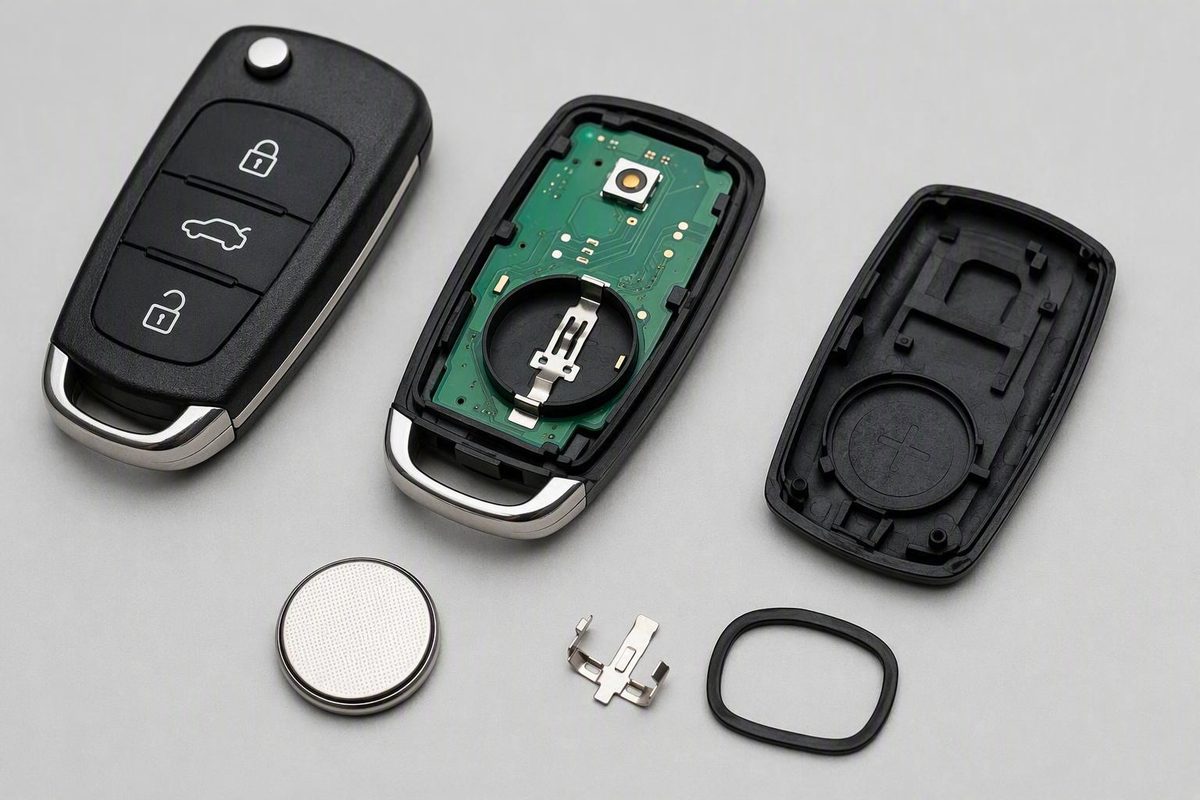
Start with the exact battery code, polarity, seating, terminal contact and case alignment—routine replacement normally doesn’t erase programming.
Check these problems before you pay to reprogram the fob.
If your key fob is not working after a battery change, first suspect the replacement or reassembly—not erased programming. Check the exact battery code, polarity, seating, terminal contact, battery condition, and case alignment. If those pass, test each function and compare the result with a spare fob to determine whether the problem follows the original fob or affects the vehicle.
Start here: seven checks in the right order
First, clarify which battery you changed. This checklist primarily covers the coin-cell battery inside the key fob. If you replaced the vehicle’s 12-volt battery and the fob stopped working afterward, skip to the vehicle-side section. That situation requires checking the vehicle battery installation and broader electrical behavior, not simply repeating the coin-cell checklist.
For a fob-battery replacement, work through these checks in order:
- Verify the full battery code. Match every character—such as CR2032 or CR2025—to the old cell or the vehicle owner’s manual.
- Confirm polarity. Use the old installation, markings inside the case, or manufacturer instructions. Do not assume the positive side always faces up.
- Check seating and terminal contact. The battery should sit securely and touch both electrical contacts as designed.
- Inspect for contamination or displaced parts. Look for dirt, moisture, corrosion, a shifted button pad, or a contact that moved when the case was opened.
- Reassemble the case correctly. Make sure the seal, button pad, circuit board, mechanical-key assembly, and case halves sit normally. Do not force the housing closed.
- Test every function near the vehicle. Try lock, unlock, trunk or liftgate, panic, passive entry, and starting separately.
- Try the spare fob. This is one of the quickest ways to judge whether the fault follows one remote or affects the vehicle generally.
Before searching for a reset procedure or booking service, record the vehicle’s make, model, year, fob type, and exact symptoms. “The buttons do nothing, but the car starts at the backup sensor” is more diagnostically useful than “the key stopped working.”
Verify the battery code, polarity, fit, and condition
A new battery can leave the fob completely dead if it is the wrong size. CR2032, CR2025, CR2016, CR1632, and CR2450 cells are not interchangeable merely because they may share a nominal 3-volt rating. Their physical dimensions differ. A cell that is too thin may not reach a terminal, while forcing a thicker cell into the holder can deform a contact or damage the housing. Match the printed code on the old battery or the owner’s-manual specification rather than choosing by appearance, as explained in this Toyota battery-fit guidance.
Next, check orientation. The correct direction varies by fob, so use the polarity markings inside the case, a photo taken before removal, the old battery’s position, or manufacturer instructions. A reversed cell can make the fob appear completely dead even when the battery itself is good.
Confirm that the cell lies flat in its holder and touches both terminals. Watch for a battery that has slipped underneath a spring contact instead of pressing against it. The case should close normally without unusual pressure.
If the code, orientation, and fit are correct, try another known-good battery of the same specified type. A newly purchased cell can still be weak or defective. A multimeter reading has limits as well: open-circuit voltage does not prove that the battery is the correct physical size, securely seated, maintaining reliable contact, or performing adequately when the fob transmits.
After installing the second battery, stand near the vehicle and test each feature independently:
- Lock and unlock
- Trunk, hatch, or liftgate release
- Panic button
- Walk-up or touch-handle passive entry
- Push-button starting
- Any remote-start function originally equipped on the vehicle
Do not treat the fob as a single all-or-nothing system. Remote buttons can fail while starting still works, and passive entry can fail while button-operated locking remains normal.
Inspect what may have moved or broken while the fob was open
When a working or partly working fob fails immediately after being opened, an installation or handling problem is plausible. The timing does not prove that the battery change caused damage, but it makes a careful visual inspection worthwhile.
Reopen the case only according to the manufacturer’s method, then look for:
- A battery sitting under a terminal rather than against it
- A contact that is displaced, loose, or detached
- A rubber button pad that is rotated or outside its recess
- A button held down by a misaligned case
- Dirt, corrosion, or moisture around the battery holder
- A cracked circuit board or visibly loose component
- A seal or mechanical-key assembly obstructing normal closure
Past impact, water exposure, worn switches, or broken battery-contact solder points can also stop a fob from operating. Opening the housing may simply reveal or aggravate an existing weakness. Excessive force during opening or closure can create a new problem.
Keep the DIY boundary conservative. Do not bend terminals, apply cleaning fluids, probe the electronics, or attempt solder repairs unless the manufacturer provides a procedure and you have the necessary skill and equipment. Stop if a terminal has detached, the board is cracked or corroded, components have moved, or the case will not close normally. Those conditions call for professional inspection or replacement assessment rather than repeated battery swaps.
Use this symptom-and-spare-fob decision table
Test the fob near the vehicle, note exactly what works, and compare it with a spare if one is available.
| Symptom | Likely direction | Next check |
|---|---|---|
| No functions work after opening the case | Battery installation, internal contact, or assembly problem | Recheck the full battery code, polarity, seating, contacts, and button-pad position |
| Range is short or response is intermittent | Weak cell, poor contact, interference, or antenna issue | Try a known-good correct cell, inspect seating, and test elsewhere |
| One fob fails but the spare works | Original fob is more likely at fault | Inspect the failed fob for contact, switch, moisture, or circuit-board damage |
| Neither fob works | A vehicle-side problem becomes more plausible | Check the vehicle’s 12-volt condition, warning messages, locks, receiver, and related systems |
| Vehicle starts at its designated backup sensor, but remote buttons fail | Some key recognition remains; remote entry is impaired | Check model-specific synchronization or transmitter diagnosis |
| Buttons work, but passive entry fails | Fob power may be present; passive-entry communication or hardware may be affected | Check model-specific instructions and passive-entry equipment |
Treat the spare-fob comparison as directional, not conclusive. A working spare does not mean the failed fob automatically needs replacement; it may still have a battery-contact or synchronization problem. Likewise, two nonworking fobs do not prove that the vehicle receiver is defective.
Location matters too. If operation improves away from a particular building, parking area, electronic device, or charging location, radio interference may be involved. Short-range or location-dependent behavior can also result from a weak cell, unstable contact, or vehicle antenna problem.
Manufacturer bulletins illustrate why individual symptoms matter. A GM bulletin covering specifically listed vehicles and equipment describes passive entry and passive starting failing while the fob buttons and backup starting method continue to work. That pattern does not automatically apply to other GM vehicles—or to a fob that is completely dead.
A Jaguar Land Rover bulletin for specified E-PACE and I-PACE vehicles addresses intermittent smart-key operation associated with possible RF receiver or coaxial-cable concerns. It is an example of a vehicle-side symptom, not evidence that changing a fob battery causes receiver or wiring faults.
Does the key fob need to be reset or reprogrammed?
Usually, no. Most fobs retain their identity in non-volatile memory when battery power is removed, so routine battery replacement normally does not require full reprogramming. Loss of synchronization or a programming fault is a secondary, vehicle-specific possibility after battery type, polarity, fit, contacts, and case assembly have been checked. General model-dependent key-fob programming guidance likewise explains that procedures vary by make, model, and year.
Three terms are often blurred together:
-
Re-synchronization restores communication between a previously recognized fob and the vehicle.
-
Immobilizer authorization permits the key or credential to start the vehicle.
The exact architecture varies. A vehicle may still start while remote lock and unlock functions fail, so successful starting does not prove that every fob function is registered and working.
Do not use a generic sequence involving repeated door openings, button presses, or ignition cycles unless it is confirmed for the exact make, model, year, and fob type. A procedure intended for a traditional ignition-key remote may not apply to a proximity smart key, and informal procedures can produce inconsistent results across vehicles.
Check the owner’s manual or manufacturer service information instead. Some re-synchronization procedures can be completed by the owner; other vehicles require dealership or qualified automotive-locksmith equipment. Paying for programming makes sense only after basic installation faults have been eliminated and the symptoms support a communication or registration problem.
When the problem is in the vehicle rather than the fob
If you changed the vehicle’s 12-volt battery, begin by confirming that the replacement battery is appropriate, its connections are secure, and the vehicle does not show broader electrical problems. Because post-replacement behavior varies by model, use the vehicle’s instructions or professional diagnosis rather than assuming the fob’s coin cell or programming is at fault.
For either battery-change scenario, a vehicle-side cause becomes more plausible when a known-good, correctly installed fob battery changes nothing and both fobs show the same failure. Possibilities include:
- A weak vehicle 12-volt battery
- An RF receiver or antenna fault
-
Damaged wiring or connectors
-
Local radio interference
- A door-lock actuator or related component fault
The battery change may have occurred at the same time as a vehicle-side fault without causing it. Sequence alone does not establish causation.
Professional diagnosis is appropriate when both fobs fail, the dashboard repeatedly reports that no key is detected, operation is intermittent across multiple fobs, or the vehicle shows other abnormal electrical behavior. A technician can test whether the fob is transmitting, whether the vehicle is receiving the signal, and whether relevant modules have stored fault information.
Service bulletins can help only after confirming the exact model, model year, equipment, production range or VIN, and symptom pattern. A bulletin describing working buttons with failed passive entry does not match a completely unpowered fob merely because the vehicle name appears in the document.
Choose a qualified automotive locksmith or dealership according to the manufacturer access and equipment the job requires. Before approving replacement or programming, ask whether the provider can test the existing fob and diagnose the vehicle.
How to get into or start the car while troubleshooting
Many—but not all—fobs contain a concealed mechanical key. It may release with a small latch and unlock the driver’s door through an exposed or covered key cylinder. The release mechanism and door-access point vary, so consult the owner’s manual rather than forcing trim or the fob housing.
Many push-button vehicles also provide a designated close-range recognition position for a low-power fob. Depending on the model, it may be near the start button, inside a console compartment, in a cupholder, or at another marked sensor. Do not assume that pressing any fob against the start button will work. Follow the documented backup-start procedure for your vehicle.
Seek professional help when:
- A battery terminal or circuit board is visibly damaged
- The fob shows corrosion or water exposure
- Internal components have moved
- The case cannot be reassembled normally
- Both fobs fail
- The vehicle has wider electrical symptoms
- Programming, receiver testing, or module diagnosis requires specialist equipment
Keep old and new coin cells away from children and pets because swallowing one can cause severe internal injury. Follow appropriate local disposal or recycling instructions; this ingestion hazard is also highlighted in Toyota’s coin-cell replacement guidance linked above.
Before paying to reprogram or replace anything, verify the exact battery code, polarity, fit, contact, and case assembly. Then use separate function tests and a spare fob to judge whether the likely fault lies in one remote or in the vehicle. For synchronization, emergency entry, and backup starting, follow instructions written for the exact vehicle.