
How to Change the Battery in a Land Rover Smart Key Without Damaging the Case
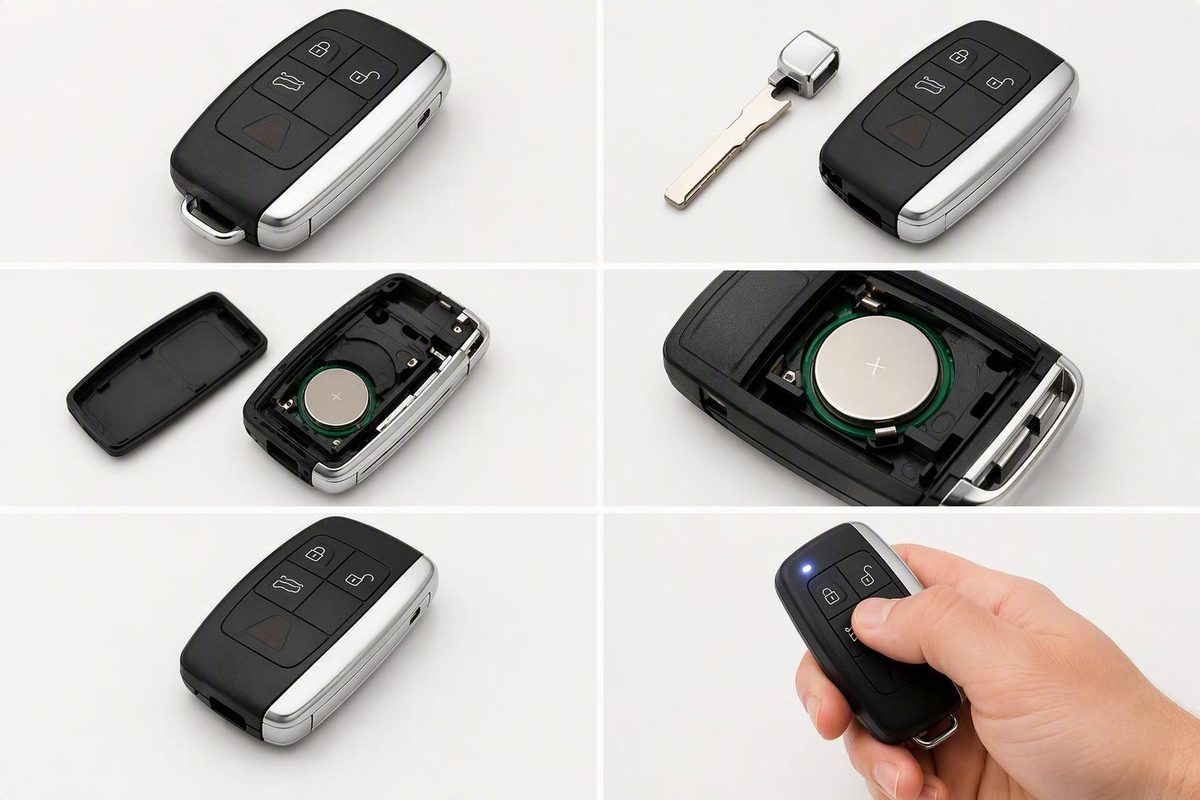
Verify compatibility first, then remove the emergency blade, open the case, fit a CR2032 positive-side up, close the fob, and test it.
If your vehicle-specific handbook or Land Rover iGuide confirms that your smart key matches the dealer-documented design, press the side button and remove the emergency key blade, use the blade to open the case, install a CR2032 battery with the positive side facing upward, snap the case closed, and reinstall the blade. The same guide says a low key-fob battery may produce an instrument-panel warning. However, it does not identify compatible models or model years, so do not use these instructions until your vehicle documentation confirms the battery and opening method. (Land Rover Palm Beach)
Check compatibility before opening the key
Compatibility warning: The dealer guide does not identify the models or model years covered by its instructions. It also provides no part number or other precise identifier that would let every reader reliably select this procedure by appearance alone.
Before opening the fob, use your owner’s handbook or VIN-specific Land Rover iGuide to verify:
- The required battery type
- The correct battery orientation
- The smart-key housing design
- The correct opening method
- The location of the emergency key release
Note which side faces upward as an additional check, but follow the vehicle-specific instructions if they differ from the dealer-documented procedure.
Proceed only when your documentation confirms that the emergency key blade is intended to open the housing. If your fob lacks the described side release, or you cannot identify the proper opening point, stop. Do not insert the blade into an unfamiliar seam or force the housing apart.
What you need
Prepare the following items:
- A verified replacement battery: Use a CR2032 only when the old battery and your vehicle documentation confirm it.
- The emergency key blade: In the documented procedure, the blade also serves as the case-opening tool.
- The owner’s handbook or Land Rover iGuide: Keep the relevant instructions visible while working.
- A clean work surface: This helps keep the battery and key components together.
The documented method does not call for a screwdriver.
Replace the battery in four steps
After confirming that your smart key uses this procedure, follow the four steps described by the authorized dealer:
-
Remove the emergency key blade. Press the button on the side of the smart key and pull out the emergency blade.
-
Open the housing carefully. Use the emergency blade at the opening identified for your fob and separate the case with controlled pressure. If the blade does not fit the documented opening or the housing does not begin to separate, stop rather than applying more force.
-
Replace the battery. Remove the old cell carefully. For this specific smart-key design, install a new CR2032 with the positive side facing upward.
-
Close the smart key. Align the housing halves and snap the case completely closed. Reinstall the emergency key blade and make sure it is retained properly.
Test the fob and check the installation
Stand near the vehicle and test a normal lock or unlock command. If the fob remains unresponsive, reopen it and check:
- The battery number matches the vehicle’s specification.
- The battery polarity follows the vehicle-specific instructions.
- The cell sits flat and securely in its holder.
- The battery and electrical contact surfaces are clean.
- The contacts have not been displaced.
- The housing is aligned and fully closed.
- The emergency key blade is correctly reinstalled.
If those checks do not restore operation, consult the handbook or iGuide before attempting programming or resynchronization. The dealer guide does not establish whether battery replacement affects key recognition or programming across all Land Rover and Range Rover models and years.
A Land Rover dealer or qualified automotive locksmith is the appropriate fallback when a verified replacement battery and correct installation do not resolve the problem. Continued failure by itself does not identify whether the cause is the battery installation, smart key, programming, or vehicle.
Emergency start when the smart key is not detected
Emergency starting is separate from replacing the battery or programming the key.
For the specific message “Smart Key Not Found – Position As Shown And Press Start Button,” Land Rover Palm Beach instructs the driver to hold the smart key against the marked area of the steering column, press and hold the brake pedal, and then press and release the START/STOP button. (Land Rover Palm Beach)
If the steering column is not marked as described, follow the vehicle’s displayed prompts and owner documentation. Do not try the key at random locations around the cabin.
Will changing a Land Rover key fob battery require reprogramming?
The dealer procedure does not establish one programming rule for every Land Rover model and year. If the key remains unresponsive after you verify the battery type, polarity, seating, contacts, and case closure, check the programming or resynchronization instructions in the handbook or VIN-specific iGuide. Seek qualified help if the vehicle still does not recognize the key.
What does a Land Rover low-key-battery warning mean?
For the design covered by the dealer guide, the instrument-panel warning indicates that the key-fob battery is running low. Treat it as a prompt to confirm the correct battery and replacement procedure for your vehicle. After replacement, test the key rather than assuming the warning or operating problem will clear automatically.
Verify compatibility first, complete the documented four-step replacement only when your fob matches, and then test the key near the vehicle. If the housing differs or correct installation does not restore operation, use the model-specific handbook or iGuide and seek qualified assistance rather than forcing the case or assuming the key needs programming.