
Before You Open Your 2015 Edge Key Fob, Check Which Battery It Uses
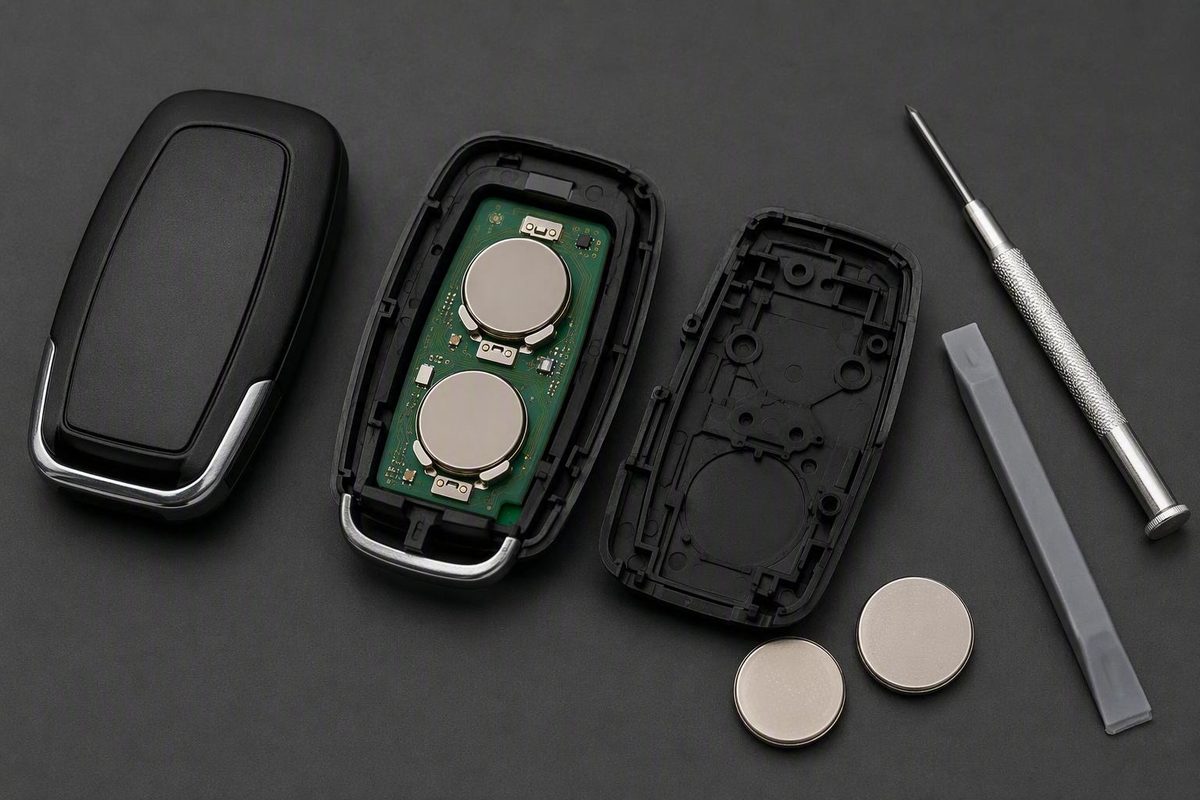
Verify the installed code and quantity first; if yours has two CR2025 cells, replace both in the same arrangement rather than relying on generic Ford advice.
For a 2015 Ford Edge key fob battery replacement, open the fob carefully and read the code on the installed battery or batteries before buying replacements. Ford’s general support guidance identifies the battery as a coin-type three-volt lithium cell and says changing it does not erase the key’s programming, but that page does not specify a battery code, quantity, or opening method for the 2015 Edge. Ford directs owners to the Keys and Remote Control section of the vehicle Owner’s Manual for those instructions. See Ford’s key-fob battery guidance.
A Battery Guru marketplace listing claims that a 2015–2017 Edge fob requires two CR2025 three-volt batteries. Treat that as seller-reported fitment, not an official Ford specification. The same listing separately presents a CR2450 option for a 2017 Edge without explaining the fob-design distinction, so model year alone is not a reliable basis for choosing cells. If your installed batteries are marked CR2025, replace both with fresh CR2025 cells in the same arrangement; otherwise, follow the markings in your fob. See the seller’s stated Edge fitment.
The short answer: verify the batteries before buying
The available official support page does not establish one universal battery code or quantity for every 2015 Edge fob. Check the code printed on each installed cell or consult the 2015 Ford Edge Owner’s Manual under Keys and Remote Control before purchasing replacements.
Use this decision table:
| What you find | What to buy | What to do |
|---|---|---|
| Two cells marked CR2025 | Two fresh CR2025 three-volt cells | Replace both and copy the original arrangement |
| A different code on the installed cell or cells | The exact code and quantity found | Do not substitute based on a generic Ford guide |
| Unmarked cells or a case that will not open safely | Nothing yet | Consult the Owner’s Manual, a locksmith, or a Ford dealer |
Ford says replacing the battery does not erase the programmed key from the vehicle.
Identify the fob and prepare for replacement
Examine your actual fob before applying pressure. Ford fob housings can have a seam, a small notch, a removable mechanical key, or a cover that slides away. Stivers Ford of Montgomery’s general Ford guide advises identifying the fob design and its intended seam, notch, or sliding cover instead of forcing the housing. That guidance is not specific to the 2015 Edge, so it should not be used to assume a universal opening point or battery layout. See the dealership’s general Ford key-fob replacement procedure.
Prepare the following:
- A clean, well-lit work surface
- A small pry tool or appropriately sized flathead screwdriver
- Exact-match replacement cells
- A phone or camera to record the original installation
Photograph both sides of the fob before opening it. Once the compartment is visible, take a close-up photo showing the battery code, number of cells, position, polarity markings, and any stacking arrangement. Do not rely on memory, particularly if two cells are installed.
Handle new coin cells by their edges. When opening the housing, keep the tool at the intended seam or notch and away from the circuit board, battery contacts, clips, and buttons. Stop if the case flexes heavily or requires substantial force.
Replace the battery without guessing the orientation
-
Remove the mechanical key or cover if your fob has one. Do not assume every 2015 Edge fob releases in the same way.
-
Locate the designed seam, notch, or sliding cover. Insert the tool only far enough to separate the housing. If the fob has a sliding cover, move it in its intended direction rather than trying to split the case.
-
Record the complete installation. Before removing a cell, confirm its printed code, the total number of batteries, the polarity, and the way the cells are positioned or stacked.
-
Remove the old battery or batteries carefully. Lift each cell from its recess or retaining clip without levering against the circuit board or bending the electrical contacts.
-
Install exact replacements. Copy the observed orientation instead of following a generic “positive side up” instruction. If the fob contains two cells marked CR2025, install two fresh three-volt CR2025 cells and reproduce the original arrangement shown in your photo.
-
Inspect without reshaping the contacts. The contacts should remain aligned with the battery surfaces. Ford says not to wipe away grease found on the battery terminals or the back of the circuit board. Its guidance also says to dispose of used batteries according to local regulations. These cautions appear in Ford’s official battery-replacement notes.
-
Close the housing fully. Snap or slide the pieces together evenly. Check that the battery contacts, button membrane, and other internal parts have not shifted or become pinched.
If the housing will not close normally, reopen it and check the battery seating and internal alignment. Do not clamp or force the case shut.
Test the fob after reassembly
Stand near the Edge for the first test. Check every function fitted to your vehicle:
- Lock
- Unlock
- Liftgate release
- Panic alarm
- Remote start, if equipped
- Proximity entry, if equipped
- Push-button-start recognition, if equipped
If the controls work nearby, increase your distance and test the lock and unlock buttons again. Normal operation at both distances is a practical sign that the replacement likely succeeded, although it does not rule out an intermittent contact or another developing fault.
Reduced range, delayed responses, repeated button presses, dashboard key-battery warnings, and intermittent push-button-start recognition can be consistent with a weak battery. These symptoms do not prove the battery is the only problem. Worn buttons, poor electrical contact, internal fob damage, or a vehicle-side issue can produce similar behavior.
Do not attempt programming simply because the case was opened or the battery was changed. A routine battery replacement does not erase the programmed Ford key.
If the key fob still does not work
Work through these checks in order:
- Confirm that each new battery has the same code as the cell it replaced.
- Verify the number of batteries against your pre-removal photograph.
- Compare the current polarity and stacking arrangement with the original installation.
- Make sure the new cells are fresh and that all packaging has been removed.
- Check that each battery is seated securely against its contacts.
- Confirm that no contact has shifted and that the case is fully closed.
- Test a spare key, if available, to help distinguish a single-fob fault from a possible vehicle-side problem.
Continued failure should not automatically be treated as lost programming. A fresh battery may not restore operation if a contact is misaligned or the fob has physical damage. If a clip, contact, housing tab, or circuit board appears cracked, loose, or bent, stop rather than repeatedly prying the housing or reshaping components.
When verified, correctly installed replacement cells do not restore operation, consult an automotive locksmith or Ford dealer. If dealer assistance is required, Ford recommends bringing all of the vehicle’s keys.