
Change Your RX 350 Key Battery Without Guessing the Coin Cell
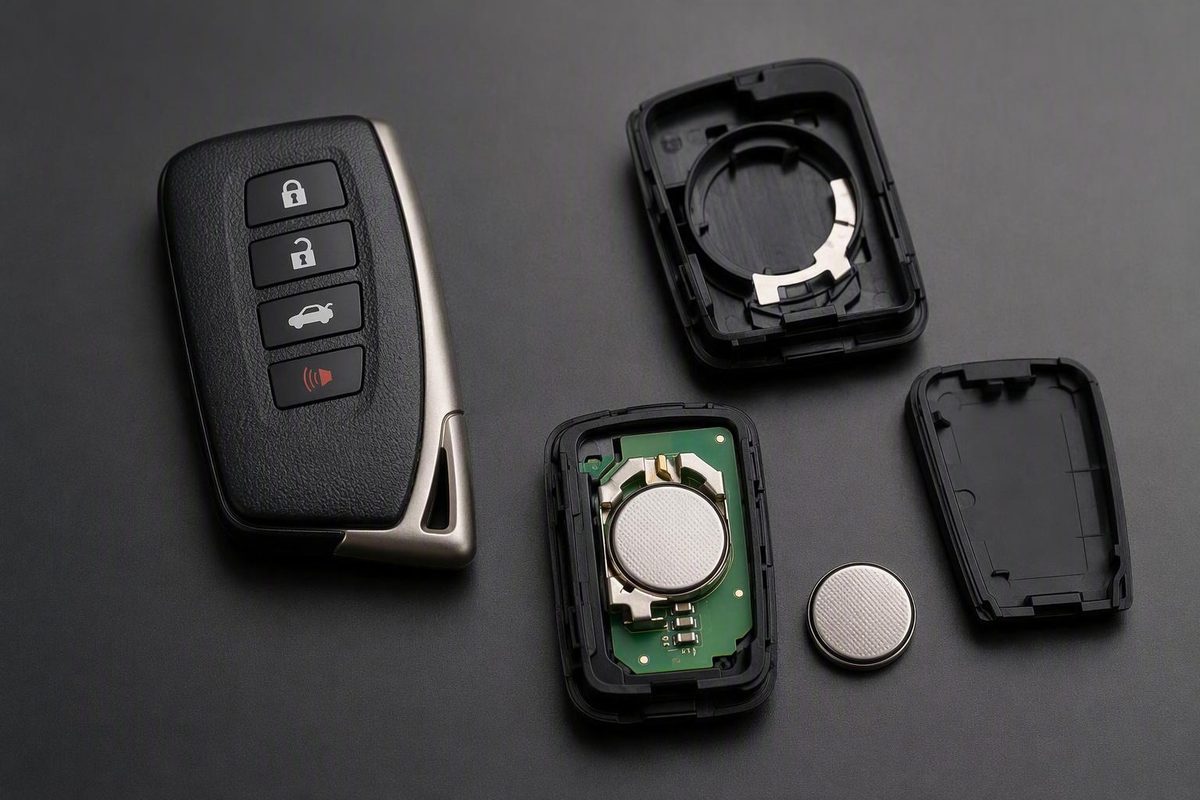
Check the manual or old coin cell for the correct code, then open the case gently, match polarity, reassemble and test every function.
Do not buy a replacement based only on the “RX 350” name. Check the owner’s manual for your exact vehicle or read the code stamped on the installed coin cell before purchasing. This guide covers the general Lexus sequence: remove the mechanical key, open the case gently, install the verified battery according to the polarity mark, reassemble the fob, and test every function.
Confirm the battery before opening the package
One Lexus dealership recommends a CR2032 for Lexus models including the RX, but its instructions are not tied to a specific RX 350 model year or fob design. (Shottenkirk Desert Lexus battery guidance)
Another Lexus dealership says Lexus vehicles may use a CR1632, CR1616, or CR2032 and tells owners to consult the applicable manual. (Lexus of Palm Beach battery guidance)
Use this order of verification:
- Check the owner’s manual for your exact RX 350 model year.
- Read the model code printed on the old coin cell.
- Compare that code with the unopened replacement package.
- Do not install the replacement if the codes differ.
Also compare the key in your hand with the instructions you intend to follow. A conventional button remote, a Smart Key, and a card key should not be assumed to use the same battery, pry point, or internal arrangement simply because they operate the same vehicle model.
Keep loose old and new coin cells secured and out of reach of children and pets. Store the used cell safely until it can be disposed of according to local requirements.
Replace the RX 350 key fob battery step by step
You will need:
- The replacement coin cell verified against the manual or installed battery
- A plastic pry tool or small flathead screwdriver
- A thin piece of tape if you are using a metal screwdriver
Work with dry hands on a dry, stable, well-lit surface. A dealership guide also recommends wrapping the screwdriver tip with tape to reduce scratching and keeping moisture out of the fob. (Lexus key-fob replacement precautions)
-
Remove the mechanical key. Find the release on the side or back of the fob. Press or slide it, then pull out the mechanical or emergency key.
-
Find the intended opening point. Use the point that matches your fob rather than forcing a tool into the middle of the case.
-
Separate the cover gently. Insert the plastic tool or tape-wrapped screwdriver only far enough to begin separating the shell. Apply light twisting pressure. Stop if the plastic flexes sharply or the cover does not release.
-
Remove the electronic key module if present. Some designs have a removable module covering the battery. Lift it by its edges and note how it sits in the case. Do not lever directly against the circuit board or buttons.
-
Remove and identify the old battery. Release the coin cell carefully and read its printed code. Compare it directly with the replacement. Stop if the numbers do not match.
-
Install the new battery with the correct polarity. Place the cell in the same orientation as the old battery and avoid forcing it into position.
-
Reinstall the module and close the case. Return any removable module to its original position. Align the shell halves and press around the perimeter until the clips engage. If the case resists closing, reopen it and check the battery and module placement.
-
Reinsert the mechanical key and test the fob. Test lock, unlock, liftgate, and panic functions as applicable. Check the fob’s indicator light, then try Smart Access and push-button start if your RX 350 has those features.
Use this checklist if the fob still does not work
An unsuccessful test does not automatically mean the new battery is defective or that the key needs programming. Check the installation first.
| Problem | First check | Next step |
|---|---|---|
| Completely unresponsive | Confirm the battery code, polarity, and seating | Refit the battery and test again |
| Intermittent operation or short range | Confirm the cell is fresh and meets the contacts | Close the case fully and retest |
| Case will not close | Check battery orientation and module placement | Reposition the parts without forcing the clips |
| Buttons work but Smart Access does not | Test every button and inspect case closure | Follow the model-year manual’s Smart Key guidance |
| Moisture, corrosion, board damage, or broken hardware | Stop disassembly | Arrange professional inspection |
If a fresh, correctly installed battery still does not restore operation, the problem may involve the buttons, electronic module, case hardware, or the vehicle’s Smart Access system.
Do not make a universal assumption about synchronization or programming after replacement. Follow the owner’s manual for your exact model year rather than using a generic reset sequence.
Start the RX 350 when the Smart Key battery may be weak
Lexus provides a temporary starting procedure when the Smart Key battery may be weak:
- Put the shift lever in Park.
- Depress the brake pedal firmly.
- Hold the Smart Key next to the START button.
- Confirm that the key indicator appears on the multi-information display.
- Give the START button a brief, firm press.
This procedure comes from official Lexus Smart Key troubleshooting guidance. It is a temporary workaround, not proof that the fob battery caused the problem.
Lexus notes that starting difficulty can also involve the vehicle’s battery or another fault. If the RX 350 still will not start after the appropriate checks, arrange diagnosis instead of repeatedly replacing the fob battery.
Recognize low-battery signs and use saving mode cautiously
Possible signs of a weak Smart Key battery include:
- Reduced lock or unlock range
- An inactive or dim key-fob indicator light
- Intermittent Smart Access operation
- Difficulty using push-button start
- An in-cabin low-key-battery alert after the engine stops
These symptoms are clues rather than a conclusive diagnosis. A damaged fob, worn buttons, radio interference, or a vehicle-side problem can produce similar behavior.
Lexus dealership guidance describes an optional battery-saving mode:
- Hold LOCK.
- While holding it, press UNLOCK twice.
- Look for four indicator flashes confirming activation.
Pressing any fob button restores normal Smart Access and push-button-start operation. Saving mode is optional and is not required to complete a battery replacement.
Verify the battery code, open the case without forcing it, follow the internal polarity mark, and test the reassembled fob. If necessary, use the Lexus temporary-start procedure. When a verified fresh battery does not fix the problem, check for a vehicle-battery or key-system fault and seek diagnosis rather than assuming another coin cell will help.