
Replace the Right Remote Without Paying Twice
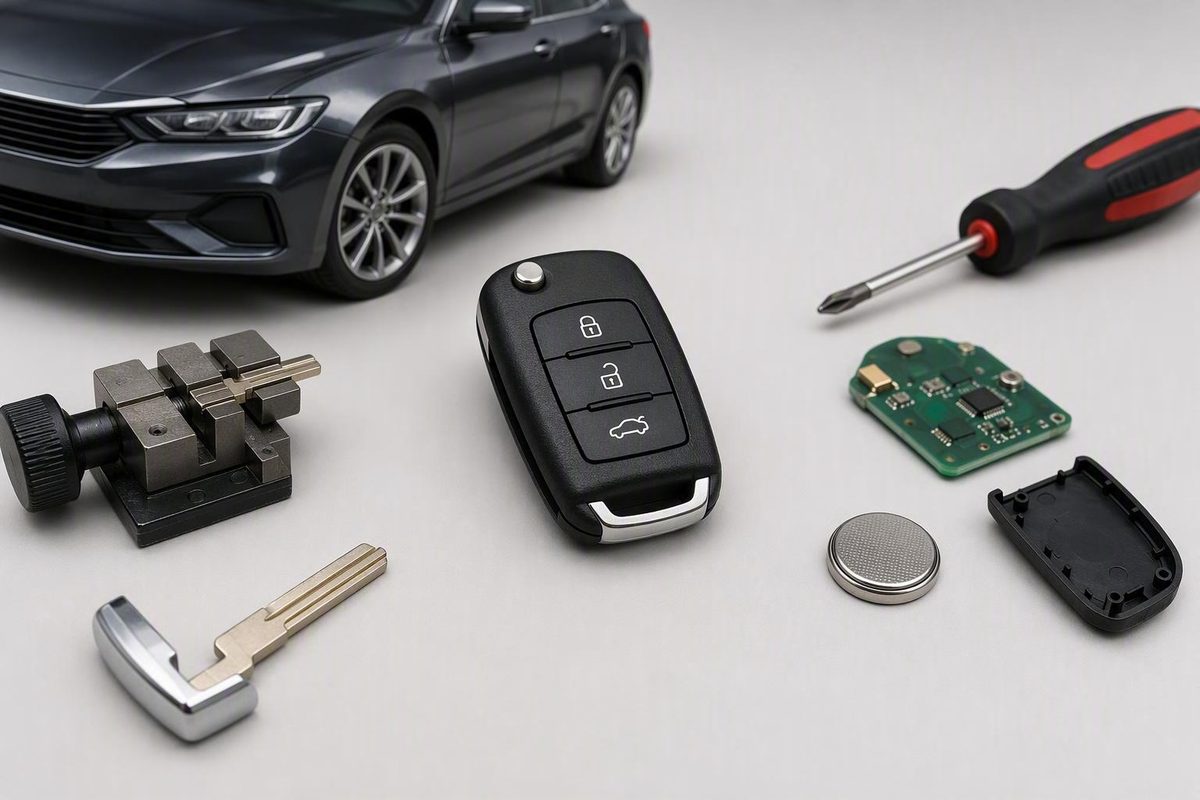
Match year, make, model, part number and functions, then account for remote pairing, immobilizer programming, blade cutting and total cost.
For a car keyless entry remote replacement, match the replacement to the vehicle’s exact electronics—not merely its shape or button count. Before buying, confirm three separate needs: remote-button pairing, transponder or immobilizer programming, and physical or emergency-key cutting. A low-priced remote that operates only the door locks may still lack what the vehicle needs for proximity entry or engine start.
Start Here: Choose the Right Replacement Path
Start with the symptom rather than assuming the entire remote has failed:
- Weak, intermittent, or short-range operation: Replace or verify the battery first. Confirm the correct battery number and orientation.
- Cracked housing, worn buttons, or a broken key ring: Consider a shell, button pad, or case replacement if the original electronics still work.
- Lost or electronically damaged remote: Buy a complete compatible remote containing all the components your vehicle requires.
- No working key remains, or owner programming is unavailable: Contact an automotive locksmith or dealership that supports the exact vehicle.
Do not treat “programming” as one task. A replacement can involve up to three independent jobs:
- Remote-entry pairing: Registers lock, unlock, trunk, panic, powered-door, or remote-start commands.
- Immobilizer programming: Registers the transponder or smart-key credential that authorizes engine starting.
- Blade cutting: Shapes a conventional, flip, or emergency blade to operate the applicable locks or ignition.
Conversely, a correctly cut mechanical key may turn a lock or ignition cylinder but still fail to start an immobilizer-equipped vehicle.
Most replacement remotes require some form of pairing, but the available method varies by vehicle. Some support an owner procedure, while others require diagnostic equipment or manufacturer-specific access. AutoZone’s programming guide advises using the exact part number and gathering all remotes because some procedures remove previously stored devices from memory during enrollment (see AutoZone’s keyless-entry programming guidance).
Do not order yet. First complete the compatibility worksheet below, including the original part number, ignition type, buttons, and number of working keys.
Identify What You Are Actually Replacing
“Key fob” can refer to several different devices. Identifying yours narrows both the product search and the likely service requirements.
- Remote-only fob: Primarily controls functions such as lock, unlock, trunk, hatch, and panic. It may hang beside a separate ignition key.
- Remote-head key: Combines remote electronics and a fixed physical blade in one housing.
- Flip key: Combines the electronics with a blade that folds or pivots into the housing.
-
Transponder key: Contains a chip that communicates with the vehicle’s immobilizer. It may or may not include remote-control buttons.
-
Smart or proximity key: May support passive entry, keyless ignition, and push-button start when the vehicle is properly equipped.
A smart key can also require separate confirmation that passive entry and push-button start work, even when its buttons respond.
Use the smallest repair that addresses the actual failure:
| Replacement scope | Appropriate when | What must be preserved or confirmed | Likely extra work |
|---|---|---|---|
| Battery only | Range is weak or operation is intermittent | Correct battery type, fit, and polarity | Possible vehicle-specific resynchronization |
| Shell or buttons only | Housing is damaged but electronics work | Original circuit board and any separate transponder chip | Careful component transfer |
| Blade only | Blade is damaged but electronics remain usable | Correct blade profile and usable original electronics | Cutting; immobilizer work may still apply |
| Remote only | Separate remote is lost or electronically damaged | Exact electronic compatibility and supported buttons | Remote pairing |
| Complete smart key | Proximity key is lost or damaged | Part number, credential compatibility, functions, and emergency blade | Specialized programming and possibly cutting |
A shell replacement can be practical, but “shell only” should mean just that. Transfer the original circuit board, battery contacts, reusable button pad, and any separate transponder chip required by the design.
Use a Compatibility Worksheet Before You Buy
Record the information below from the vehicle, original remote, owner documentation, seller, or programming provider.
| Compatibility field | Your details |
|---|---|
| Model year | ________ |
| Make | ________ |
| Model | ________ |
| Trim or configuration | ________ |
| Original remote part number | ________ |
| FCC ID | ________ |
| Buttons and functions | ________ |
| Ignition type: keyed or push-button | ________ |
| Number of working keys | ________ |
| Number of working remotes | ________ |
| Factory or aftermarket system | ________ |
Begin with the exact year, make, model, and trim. Then compare the original part number and every required button or function. Ask the seller or programming provider to confirm that the proposed device supports that exact configuration.
Appearance is not proof of fit. Two remotes may share a case and button layout while using different frequencies, communication protocols, part numbers, or immobilizer credentials. Even a matching button count can hide a meaningful difference, such as trunk release versus powered-liftgate control.
The FCC ID is commonly printed on a label inside or outside the original device. Some products with a display can present the identification electronically. For an FCC search, divide the ID into:
- A three- or five-character grantee code
- The remaining product code, which may include hyphens
The FCC’s official FCC ID lookup instructions explain how to split and search these codes. The database identifies equipment-certification records; it does not confirm that a remote is compatible with a particular vehicle. Use the FCC ID as one identifier alongside the vehicle details and original part number—not as a fitment guarantee.
If the remote controls an aftermarket alarm or remote-start system, use a separate fitment path. The remote may belong to the installed accessory rather than the vehicle’s factory keyless-entry module. In that situation, the original remote’s part number, FCC ID, and system brand can be more useful than a standard year-make-model selector.
Before cutting a blade, opening a sealed package, or attempting programming, obtain written confirmation of fitment. Save the listing, seller response, and product identifiers in case the item proves incompatible.
Compare OEM, Aftermarket, Refurbished, Used, Universal, and Shell-Only Options
No category is automatically right for every vehicle. Compare the exact product, its internal components, and its programming path rather than assuming a label guarantees success.
| Option | What it is | Possible fit | Checks and principal limitations |
|---|---|---|---|
| OEM | Made by the vehicle manufacturer or an authorized supplier | Exact factory application only when the verified part number and configuration match | Confirm supersessions, ignition type, functions, included blade, condition, and programming |
| Aftermarket | Third-party product designed for selected vehicles | Listed supported applications | Verify frequency, protocol, functions, chip, cutting, and programming |
| Refurbished | Reconditioned device, sometimes with original circuitry and replacement exterior parts | When the retained electronics match | Determine which parts are original, replaced, and tested |
| Used | Previously owned and possibly previously enrolled | Some reusable systems | Condition and reusability are uncertain; never assume a smart key can be reset |
| Universal | Configurable remote covering a stated compatibility list | Selected remote-entry systems | Does not automatically replace a blade, transponder, smart key, or proximity credential |
| Shell only | Empty housing, buttons, or case | Working electronics with physical damage | Requires careful transfer; does not repair failed circuitry |
OEM refers to a key or remote made by the vehicle manufacturer or an authorized supplier. Aftermarket products are made by third parties for selected applications. Either may still need cutting and programming, and an aftermarket unit can differ in logo, case shape, or button markings. KeyMe’s commercial explanation of OEM and aftermarket key sourcing also notes that aftermarket fit depends on the supported model and correct synchronization.
“Refurbished OEM” does not necessarily mean the entire assembly is new. A refurbished remote may retain original circuitry while using a replacement case, buttons, pad, or blade. Read the condition description closely and ask what was replaced.
Used remotes deserve extra caution. Reusability can depend on the vehicle, remote condition, previous enrollment, and whether the system permits that credential to be registered again. Do not buy a used smart key based on an unsupported promise that it can always be unlocked or reset.
Universal remotes are universal only within their published coverage. For example, Car Keys Express markets one remote for selected vehicles from model years 1997–2018 and directs buyers to a separate compatibility picker. That is broad coverage, not every-vehicle compatibility (review the manufacturer’s stated universal-remote scope). Confirm the exact vehicle, working-key prerequisites, and supported functions.
Choose shell-only replacement when the casing is the problem and the electronics are known to work. It is the narrowest repair, but it requires preserving every necessary internal component.
Decide Between DIY, Locksmith, and Dealership Programming
Most complete replacements need pairing or programming. Whether you can do it yourself depends on the exact year, model, ignition system, remote, and whether a working key is available.
| Path | Use it when | Confirm before proceeding |
|---|---|---|
| Owner or manufacturer procedure | The owner’s manual gives an onboard procedure for the exact vehicle and remote | Required working keys, sequence, remote limit, and whether stored remotes are erased |
| Automotive locksmith | The locksmith supports the vehicle and has suitable equipment | Customer-supplied hardware policy, all-keys-lost capability, cutting, and separate fees |
| Dealership | Manufacturer-specific support is required or another provider cannot support the system | Correct part lookup, proof-of-ownership requirements, appointment terms, and total quote |
Newer push-button-start vehicles are more likely to require specialized equipment, but that is not a universal rule. A commercial programming guide from Locksmith Keyless likewise distinguishes self-programmable products from newer push-button applications that may require an equipped automotive locksmith (check its vehicle-based programming guidance).
Some onboard, spare-key, cloning, and universal-remote procedures require an existing key or remote that already works.
Bring every existing key and remote to the appointment. Some procedures clear previously stored remotes and then register all authorized devices again. Before leaving, test the old devices as well as the replacement.
Avoid generic ignition-and-button sequences found in unverified instructions. A sequence that works for one model year can fail on another version of the same model. Use the owner’s manual, manufacturer documentation, or instructions confirmed for the exact vehicle and remote.
Use this call script when comparing providers:
“I have a [year, make, model, trim] with [keyed/push-button] ignition. The replacement remote has part number [number] and FCC ID [ID]. Do you support this exact vehicle and customer-supplied hardware? Do you need an existing working key? Please quote remote pairing, immobilizer programming, blade cutting, diagnostics, and mobile service separately. What happens if this remote cannot be programmed?”
Also ask what proof of ownership and identification to bring, whether the vehicle must be present, and whether an unsuccessful programming attempt incurs a diagnostic or labor fee.
Calculate the Complete Replacement Cost
Do not compare only the advertised fob price. Calculate the complete installed cost:
| Cost item | Quoted amount |
|---|---|
| Remote or key hardware | $__ |
| Battery | $__ |
| Remote-button pairing | $__ |
| Transponder or immobilizer programming | $__ |
| Physical or emergency-blade cutting | $__ |
| Diagnostic fee | $__ |
| Mobile-service or call-out fee | $__ |
| Shipping | $__ |
| Sales tax | $__ |
| Possible return shipping | $__ |
| Estimated total | $__ |
AutoZone lists approximate hardware ranges of $50–$100 for a basic fob, $50–$150 for a remote-start fob, $125–$400 for a flip-key fob, and $200–$400 for a smart-key fob. It separately estimates programming at roughly $50–$100. These are changeable, retailer-provided category estimates—generally before programming—not dated national averages or quotes for a particular vehicle. Confirm current pricing directly before buying (see AutoZone’s remote-cost categories and exclusions).
Displayed online prices can illustrate how widely hardware varies, but they do not prove what your installed replacement should cost. Listings may change, and a seemingly inexpensive item may omit the transponder, blade, battery, programming, cutting, tax, or shipping.
Ask each seller or provider for an all-in written quote. It should identify:
- The exact remote or key being supplied
- Whether the battery and emergency blade are included
- Remote pairing and immobilizer programming
- Key cutting
- Diagnostic and mobile-service charges
- Shipping and tax
- The charge if customer-supplied hardware fails to program
- Any refund or replacement remedy
A locksmith, dealership, and DIY purchase may include different scopes, so a simple provider-versus-provider price ranking can be misleading. Compare totals for the same hardware, functions, and all-keys-lost or spare-key scenario.
Check Return Terms Before Cutting or Programming
Return rules vary by seller. Before opening the package, installing a battery, cutting a blade, or attempting programming, ask whether that action changes the item’s return eligibility and obtain the answer in writing.
Complete this checklist first:
- [ ] Written fitment confirmation for the exact year, make, model, trim, and ignition type
- [ ] Original and replacement part numbers compared
- [ ] FCC ID checked as an identifier, not used as the sole fitment test
- [ ] All included components listed: electronics, transponder, blade, battery, and shell
- [ ] Product condition stated as new, refurbished, or used
- [ ] Every required function confirmed
- [ ] DIY or professional programming requirement confirmed
- [ ] Working-key or working-remote prerequisites confirmed
- [ ] Blade type and cutting requirement confirmed
- [ ] Return window and return-shipping responsibility documented
- [ ] Rules for opened packaging, battery installation, cutting, and attempted programming documented
- [ ] Fitment, programming, and product guarantees distinguished
Ask whether the seller guarantees only that the physical product is free of defects or also guarantees compatibility and successful programming for your vehicle. Those are different commitments.
Verify remote start, trunk release, powered hatch, sliding-door controls, proximity entry, and other special buttons individually. One universal-remote listing, for example, limits its function buttons to applicable features already installed on the vehicle and requires a working engine-starting key for setup (see the retailer’s product-specific prerequisites).
Treat statements about testing, quality, sales volume, savings, and broad compatibility as seller claims unless independently established. A prominent return-policy or guarantee headline is not a substitute for reading its complete terms and exclusions.
Test Every Function and Troubleshoot a Failed Pairing
Test the replacement before accepting the job or discarding packaging. Stand near the vehicle and check every applicable function:
- [ ] Lock
- [ ] Unlock, including driver-only and all-door behavior
- [ ] Panic alarm
- [ ] Trunk or hatch release
- [ ] Powered liftgate or sliding doors
- [ ] Remote start
- [ ] Passive or proximity entry
- [ ] Emergency blade in the applicable lock
- [ ] Keyed ignition, if equipped
- [ ] Push-button engine start
- [ ] Every pre-existing key and remote
Do not assume that working lock buttons prove the whole key is ready.
If pairing is unsuccessful, troubleshoot in a controlled order:
- Install or verify a fresh, correctly fitted battery. Check the battery number, orientation, contacts, and case closure.
- Recheck the exact replacement identifiers. Compare the part number, FCC ID, supported vehicle, ignition type, and listed functions.
- Confirm the procedure. Make sure the instructions apply to the exact year, make, model, and remote—not merely a similar-looking vehicle.
- Repeat only when the documentation permits it. Avoid improvised sequences or repeated attempts when the instructions warn against them.
- Seek professional diagnosis. An equipped provider can determine whether the problem lies with the remote, enrollment process, immobilizer system, or vehicle.
Possible causes include incompatible hardware, the wrong radio frequency or protocol, incomplete or interrupted programming, a weak battery, damaged used electronics, or a function the replacement does not support. These are troubleshooting possibilities, not a remote diagnosis.
Adding a new remote does not necessarily delete or disable the lost one. If the original was lost or stolen, ask an authorized locksmith or dealership what vehicle-specific options exist for removing old credentials from memory and re-registering the keys you still possess.
Use a simple three-step finish:
- Record the vehicle details, original part number, FCC ID, ignition type, and functions.
- Confirm fitment in writing and obtain an itemized quote for pairing, immobilizer programming, and cutting.
- Test every supported function—and every existing key—before accepting the replacement.
The best defense against paying twice is not the lowest advertised hardware price. It is verified compatibility and a complete quote for everything required to make the replacement work.