
Dodge Charger Key Fob Not Working? Start With These Checks
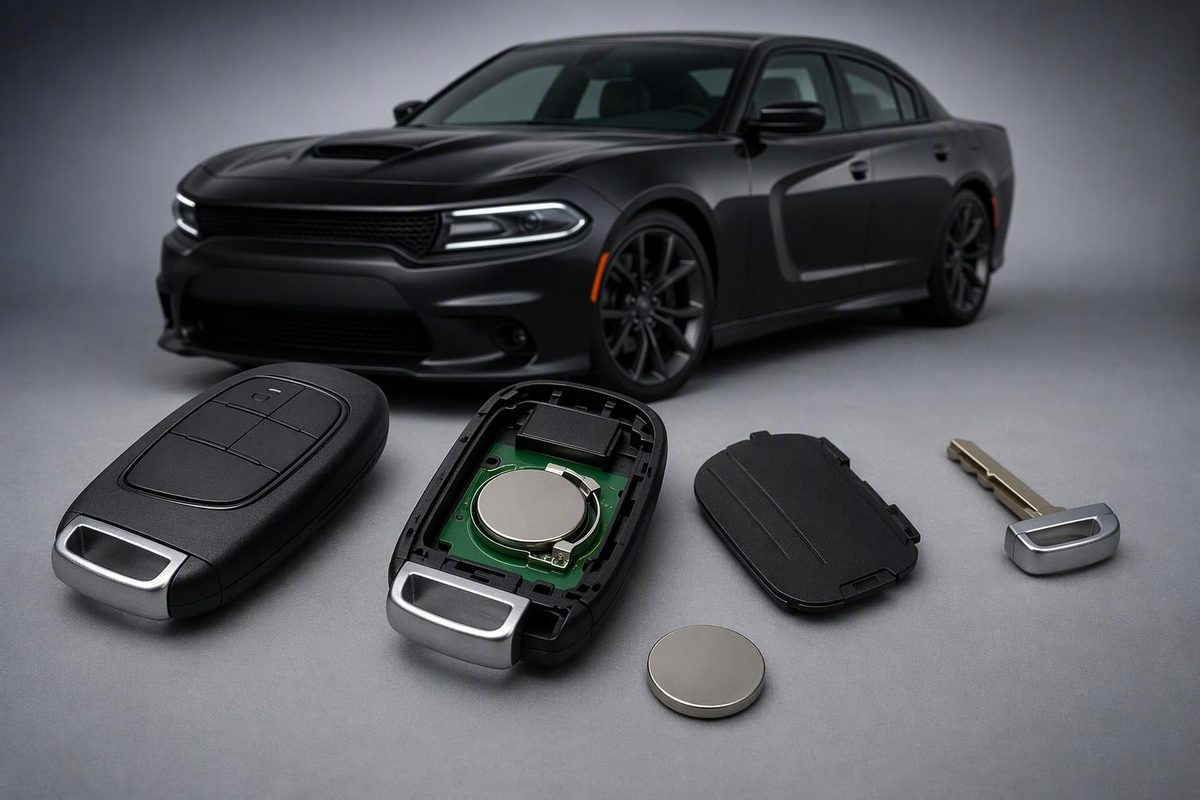
Separate Charger remote-locking, passive-entry and starting faults. Check the battery, use the documented backup start, and know when to seek service.
If your Dodge Charger key fob is not working, compare it with a known-working spare, if available, before buying a replacement. Separate three questions: do the remote buttons work, does the door handle recognize the fob, and will the car start? Those functions do not necessarily fail together.
First identify your model year and ignition type. The 2010 Charger manual describes a fob inserted into the ignition; the 2011 and 2023 manuals describe push-button ignition with a fob-to-button backup method. The procedures below are documented for those years, not every Charger. Match them to your vehicle and fob, especially if you have an aftermarket remote. For a newer Charger Daytona, use its own manual. (2010 manual, pp. 12–13; 2011 manual, pp. 12–14; 2023 manual, p. 16)
1. If you cannot unlock or start the car
Use the emergency key for entry
For the documented 2010 and 2011 fobs, slide the mechanical release and pull out the stored emergency key. It provides mechanical entry when the fob or vehicle battery is dead. Unlocking the door mechanically is not the same as authorizing the engine to start. (2010 manual, p. 13; 2011 manual, pp. 13–14)
The alarm may sound: the 2023 manual says the driver’s door key cylinder does not disarm the security system. Cycling the ignition out of OFF with a valid fob is a documented disarming method. (2023 manual, p. 19)
Try the documented push-button backup start
For a matching push-button system described in the 2011 or 2023 manual:
- With the vehicle stationary, put it in Park and hold the brake pedal down.
- Place the nose of the fob—the end opposite the emergency key—against the ENGINE START/STOP button.
- Use the fob to push the button once.
Dodge documents this method for a low or depleted fob battery. It is a backup starting procedure, not a reset or programming sequence. (2011 manual, pp. 12 and 349; 2023 manual, pp. 16 and 74)
If it works, inspect the fob battery next. If neither programmed fob starts the car, or the dashboard is dark and the electrical systems are unresponsive, stop treating this as only a coin-cell problem. Arrange vehicle-battery testing or roadside assistance rather than repeatedly attempting to start it.
2. Compare the symptoms before opening the fob
Test each fob separately, with the vehicle parked and the ignition off. Keep the fob away from your phone or laptop: Dodge warns that nearby electronics can block its wireless signal. If the failure occurs only in one location, retest elsewhere when you can safely move the vehicle. The 2010 manual also identifies nearby radio transmitters as a possible cause of reduced remote performance. (2023 manual, p. 13; 2010 manual, p. 26)
Use these results to choose the next check—not as a final diagnosis:
| What you observe | What to check next |
|---|---|
| The spare works normally; the usual fob does not | Battery installation, contacts, buttons and damage in the failing fob |
| Both fobs fail only at one location | Interference before replacement or programming |
| Remote buttons work, but grabbing the handle does not unlock | Passive Entry settings and the affected handle |
| Only one button fails | That button and its function, rather than assuming total battery failure |
| Both fobs fail everywhere | Vehicle power and keyless-system diagnosis, after checking both fob batteries |
3. Replace the correct battery, using the correct opening method
The 2010, 2011 and 2023 Charger manuals specify one CR2032, but their access instructions differ. Confirm the cell code and polarity in your own fob before removing it; photograph the installation if needed.
- 2010 documented fob: gently open the rear battery access door using a small flat-blade screwdriver in its slot. Replace the cell and snap the access door back into place. Do not split the whole case merely because another Charger guide shows that method. (2010 manual, pp. 24–26)
- 2011/2023 documented split-case fob: remove the emergency key and gently separate the halves, protecting the seal. The 2011 manual specifies inserting the emergency-key tip or a #2 flat-blade screwdriver into the slot; the 2023 manual specifies a #2 flat-blade screwdriver or coin. Install the CR2032 with its positive sign matching the positive sign inside the battery clip on the back cover, then snap the halves together. Avoid touching the circuit board and battery terminals. (2011 manual, pp. 23–24; 2023 manual, pp. 14–15)
Keep new and used coin cells away from children. If the case will not close securely, stop using it and keep it out of their reach. If a battery may have been swallowed or placed inside any part of the body, seek immediate medical attention. (2023 manual, p. 15)
Still dead after replacement?
Recheck the exact cell code, polarity, seating and case closure. Look for a loose contact, corrosion or damage, but do not bend terminals or probe the board as a first step. Try a second fresh cell before declaring the remote defective. For a closer installation checklist, see key fob not working after a battery change.
Dodge’s cited battery-replacement procedures end with reassembly; they do not prescribe a post-change programming sequence. A continuing fault is not, by itself, proof that the fob lost programming. If a fresh battery restores every function, stop here—replacement-key programming is unnecessary.
4. Check function-specific failures
Passive Entry only: on the 2023 Charger, confirm that Passive Entry is enabled in Uconnect. Test without gloves and check for salt or dirt on the handle. Dodge notes that gloves, weather and contamination can affect sensitivity. Compare both front handles before replacing a fob that otherwise works. Wait two seconds after pressing a handle’s lock button before testing handle-based unlocking. (2023 manual, pp. 22–23)
Remote start only: if locking and normal starting work, read the cancellation message first. The 2023 system requires conditions including closed doors, hood and trunk, sufficient fuel, acceptable vehicle-battery charge and no illuminated check-engine light. Its remote-start command is two presses within five seconds. Test only outdoors, never in a closed garage or confined area. (2023 manual, pp. 17–19)
5. When to seek diagnosis or programming
Arrange professional diagnosis if a correctly installed fresh cell changes nothing, the fob has visible damage, both programmed fobs fail, or backup starting fails. On the 2023 Charger, a security light that remains on after its initial bulb check indicates an electronics problem. An engine that starts with a valid fob and shuts off after two seconds can also indicate a vehicle-electronics issue. (2023 manual, p. 15)
For replacement keys, the 2023 manual describes authorized-dealer programming of a blank fob that has never been programmed. It says the factory system cannot reprogram a fob from another vehicle. Do not buy a used remote solely because its case and buttons look right. If considering an automotive locksmith, confirm compatibility and programming-equipment support for your exact Charger before purchasing the fob. (2023 manual, p. 15)
Bring every vehicle key and your test results: which buttons fail, whether the spare works, whether backup starting succeeds, and the exact dashboard warning. Those observations help distinguish a fob repair from a vehicle-side fault.