
How to Find Out Whether the Problem Is the Battery, the Fob, or the Car
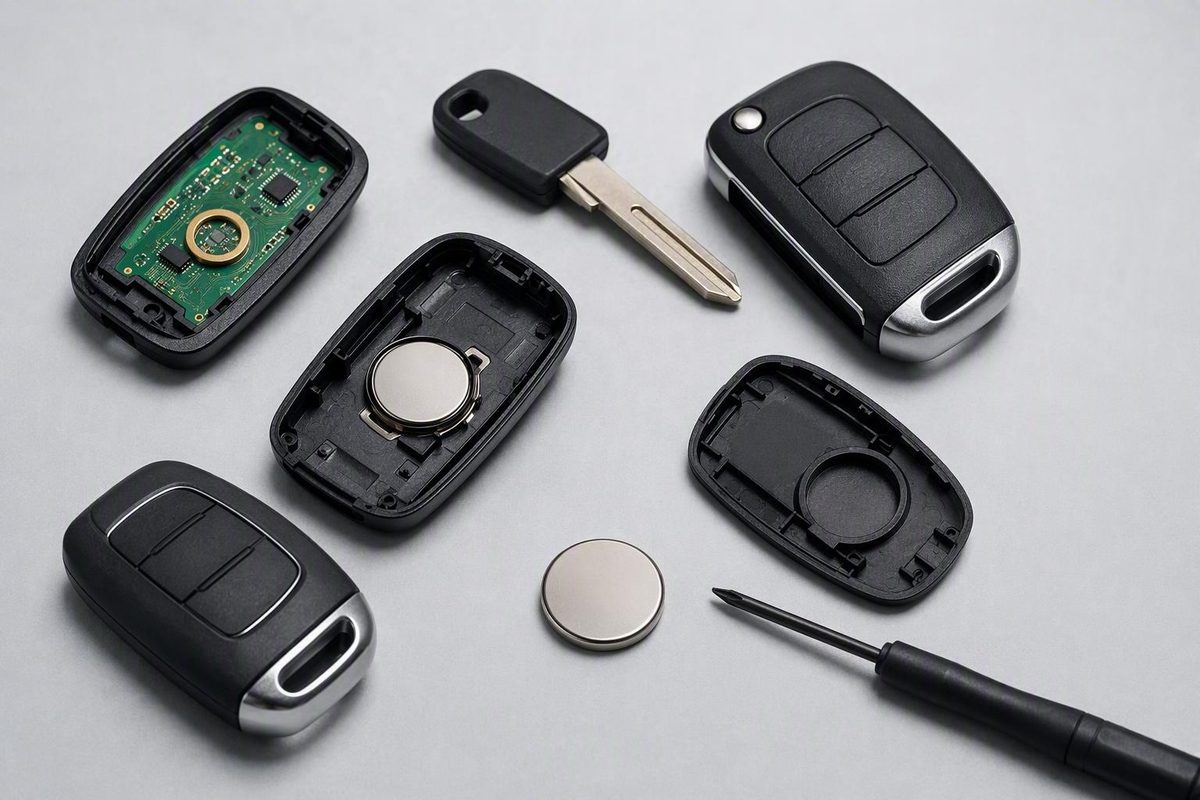
Verify the battery installation, compare a known-good spare, inspect for damage, and test the vehicle and fob elsewhere before escalating.
When your key fob is not working, the battery is an obvious suspect—but it is not the only one. A wrong or poorly seated coin cell, worn buttons, impact or water damage, radio interference, lost synchronization, or a vehicle fault can produce similar symptoms.
The fastest diagnosis starts by identifying the exact function that failed. Remote lock buttons, passive entry, push-button key detection, and engine-start authorization do not necessarily depend on the same components. Treat each symptom as a clue, not proof.
Procedures vary by make, model, year, market, and key type. Your owner’s manual and verified manufacturer instructions should take priority over general advice, especially for emergency entry, backup starting, and programming.
Start Here: A Key Fob Checklist
Work through these checks in order, beginning with the safest and least expensive:
- Identify exactly what failed. Test lock, unlock, trunk or liftgate, and panic buttons separately. If equipped, also check passive door entry, push-button detection, and engine-start authorization.
- Move close to the vehicle and retry. If the fob responds only at very short range, a weak battery or poor battery contact is plausible.
- Test the vehicle and paired fob in another open location. If feasible, move the vehicle away from the garage, parking area, or driveway where the failure occurs. A problem confined to one location points more strongly toward radio interference than a failure that occurs everywhere.
- Verify the battery code. Read the code on the old cell, the markings inside the fob, or the owner’s manual. CR2025 and CR2032 are different batteries; do not substitute one merely because it fits. The required type depends on the fob (ALOA consumer guidance).
- Check the installation. Confirm polarity, seating, contact pressure, and complete case closure. Make sure no insulating sticker remains on the replacement cell.
- Try a known-good spare. The comparison is useful only if the spare has a good battery and is correctly programmed to the vehicle.
- Inspect the fob. Look for cracks, case gaps, impact marks, moisture residue, corrosion, rattling parts, or buttons that stick or need excessive pressure.
- Check the vehicle’s interior lock switch. If it also fails, the problem may extend beyond the fob.
- Use the manual if you are locked out or see “Key Not Detected.” Look up the concealed mechanical key, hidden door-lock cylinder, and vehicle-specific backup reading point.
- Escalate if the basic checks do not resolve the fault. Model-specific synchronization, electronic fob testing, or vehicle-side diagnosis may be necessary.
Do not skip the first question: What exactly stopped working? A fob whose lock button fails while its trunk button and starting function still work presents a different diagnostic pattern from one that is completely unresponsive.
Match the Symptom to the Most Useful Next Test
The way a key fob fails can narrow the possibilities, but it cannot conclusively identify the defective part.
| Symptom | Plausible causes | Safe next test | Escalation point |
|---|---|---|---|
| Range gradually became shorter | Weak coin cell, poor battery contact, interference | Install the exact specified fresh cell; test the vehicle and fob elsewhere | Range remains poor with a known-good battery |
| Buttons respond only after repeated presses | Weak battery, worn button pad, dirty or loose contact | Check battery seating and compare individual buttons | Continued intermittent operation after basic checks |
| One or two buttons do not work | Worn button pad, localized contamination, case or board damage | Test every button and compare how each feels | Individual controls remain dead or the case is damaged |
| All functions stopped after a drop | Dislodged battery, bent contact, cracked solder joint or board | Inspect the shell, battery, and visible contacts | Rattling parts, exposed circuitry, or suspected board damage |
| Failure followed water exposure | Moisture or corrosion damage | Stop using the fob if it remains wet; inspect for residue or corrosion | Salt water, visible corrosion, or persistent failure |
| Works in one place but not another | Radio interference or shielding | Test the paired vehicle and fob together in another location; unplug nearby accessories | Failure begins occurring everywhere |
| Primary fob fails but verified spare works | Primary-fob battery, contacts, buttons, programming, or board | Recheck and inspect the primary fob | A fresh, correct battery does not help |
| Every verified fob fails | Interference, vehicle battery, fuse, receiver, antenna, wiring, ground, or module | Test elsewhere; check interior locks and other electrical systems | All fobs fail everywhere after basic checks |
| “Key Not Detected” appears | Fob battery, interference, damage, synchronization, proximity antenna, or vehicle fault | Try the manual-specified backup reading point and spare | Warning persists or the vehicle cannot be restarted |
| Buttons work, but the engine will not authorize a start | Proximity detection, transponder, immobilizer, or vehicle-side issue | Try the spare and specified backup-start method | Neither valid fob authorizes starting |
| Buttons fail, but the car still starts | Coin cell, button pads, remote programming, or remote-entry reception | Test all buttons and compare the spare | Both fobs lose remote functions |
| Failure began after vehicle power loss or electrical work | Coincidence, weak batteries, synchronization, fuse, wiring, or control issue | Repeat basic checks and consult model-specific guidance | Multiple fobs or other body systems remain affected |
Gradually shrinking range, intermittent response, and repeated presses often fit a weakening battery. Selective button failure is more consistent with a worn button pad, dirty contact, or localized damage. Neither pattern is conclusive.
Sudden total failure deserves a different line of questioning. Ask whether the fob was dropped, immersed, crushed, opened, or exposed to recent electrical work. If the timing follows a vehicle-battery replacement or power loss, synchronization is possible on some vehicles—but timing alone does not establish causation.
A “Key Not Detected” message means the vehicle is not sensing the smart key. It does not reveal whether the cause is the fob battery, interference, physical damage, synchronization, an antenna, or another vehicle-side fault. Backup detection also varies by model, so use the manual rather than assuming one universal technique (explanation of “Key Not Detected”).
Why a New Key Fob Battery May Not Fix the Problem
A battery can be new and still fail to power the fob correctly. Before assuming that the fob lost programming, reopen the case carefully and verify the installation from the beginning.
Check the exact code. Use the code specified on the old battery, inside the housing, or in the owner’s manual. Do not substitute a similar-looking cell merely because it enters the compartment.
Confirm polarity. Match the positive and negative orientation to the fob’s markings or the documented procedure. Remembering how the old battery appeared helps only if it was installed correctly.
Inspect seating and contact pressure. The cell should sit flat and be held firmly by its contacts. A clip may have been bent during opening, or the battery may have shifted while the case was being closed. Do not force delicate contacts or improvise an internal repair.
Check for barriers and contamination. Remove any insulating sticker from the cell. Look for dirt, moisture residue, or corrosion at the contact surfaces. Avoid aggressive scraping or chemical treatment, particularly in a sealed or fragile fob.
Close the housing completely. If the case will not latch with gentle pressure, reopen it and look for the obstruction rather than forcing it.
A nominally new battery may also be depleted or defective. If possible, try another fresh cell from a reliable package. An unloaded voltage reading can be informative, but it is not definitive proof that a coin cell will perform adequately when the fob draws power.
Programming is a separate question. Battery replacement does not universally erase a fob’s programming, although some vehicles may require model-specific synchronization. Internet reset rituals should not be treated as universal instructions.
One Toyota forum discussion, for example, includes reports of an ignition-key sequence restoring some conventional remotes, while other participants said it did not work or that diagnostic equipment was required. The discussion is anecdotal, ambiguously documented, and not applicable to every Toyota or to push-button smart keys (Toyota battery-replacement discussion).
Use only the procedure in the owner’s manual or verified manufacturer information for the exact vehicle and key type. If no owner procedure is documented, a qualified automotive locksmith or dealer may need diagnostic equipment.
One Fob or Every Fob? The Fastest Way to Separate Fob and Vehicle Faults
A verified working spare is the most useful comparison test available to most owners.
If the spare works normally, concentrate on the primary fob:
- Exact battery type and polarity
- Battery freshness, seating, and contact pressure
- Individual buttons and the rubber button pad
- Cracked or distorted housing
- Moisture or corrosion
- Lost remote synchronization
- Circuit-board damage
If every verified fob fails, widen the investigation:
- Radio interference
- Vehicle-battery condition
- Relevant fuses
- Receiver or antenna power and ground
- Wiring and connectors
- Water intrusion
- Body-control or other control-module faults
The word verified matters. A spare that has sat unused for years may have a depleted coin cell, damaged contacts, or invalid programming. Two unverified fobs failing is much weaker evidence than two fobs known to have operated the vehicle recently.
Check the interior door-lock switch as well. If the switch also fails, vehicle power, fuses, actuators, wiring, or body-control functions become more plausible.
Simultaneous failure of two fobs suggests a shared environmental or vehicle-side cause, but it does not prove that the receiver or control module has failed. A staged diagnosis should verify power, grounds, wiring, interference, and incoming commands before an expensive module is condemned. Receiver, antenna, wiring, power-supply, and body-control faults are all possibilities when known-good fobs fail, but accessory, location, switch, code, and live-data checks should come first (vehicle-side receiver diagnosis overview).
Use this three-branch decision tree:
-
One fob or all fobs? - One fails and a verified spare works: focus on the failed fob. - All verified fobs fail: test for interference and investigate the vehicle.
-
One location or everywhere? - Only one location: interference moves higher on the list. - Everywhere: battery, fob hardware, programming, and vehicle faults remain possible.
-
Remote-only failure or starting failure? - Buttons fail but starting works: focus on the remote transmitter and remote-entry path. - Buttons work but starting fails: focus on proximity detection, the transponder or immobilizer, and vehicle authorization. - Neither works: use the spare and documented backup procedure, then broaden the diagnosis.
This decision tree identifies where to look next. It does not replace testing.
Why the Buttons Can Fail While the Car Still Starts
A modern key can support several related but distinct functions:
- Remote keyless-entry commands: You press lock, unlock, trunk, or panic, and the fob transmits a command.
- Passive proximity detection: The vehicle detects an authorized key nearby for touch-to-unlock or hands-free entry.
- Immobilizer or start authorization: The vehicle verifies an authorized credential before allowing the engine to start.
These functions may use separate components, antennas, circuits, or communication methods. One can therefore work while another fails.
If the remote buttons are dead but the car still starts normally, prioritize:
- The fob’s coin-cell battery
- Battery contacts and seating
- Worn or damaged button pads
- Remote-entry synchronization or programming
- The vehicle’s remote-entry receiver path
If the buttons work but the engine will not authorize a start, shift attention toward passive detection, the transponder or immobilizer, and vehicle-specific diagnosis. Try a verified spare and the manufacturer’s backup-start procedure before assuming the fob must be replaced.
A successful backup start proves only that the vehicle recognized the credential through that backup method. It does not prove that the fob’s normal radio transmitter, proximity circuitry, every vehicle antenna, or the ordinary receiver path is healthy.
A reported Jaguar case illustrates the distinction. Both fobs lost remote entry and normal detection, yet the vehicle could start when a fob was placed at the steering-column backup location. The final cause was not established, so the case demonstrates separate functional paths—not a universal Jaguar diagnosis (reported Jaguar troubleshooting exchange).
A model-specific Dodge forum account offers another limited example. After a vehicle-battery replacement, an owner reported that remote functions failed while starting remained possible. The owner later said a dealer reprogrammed one fob and found the other defective. This anecdote shows that remote programming and hardware faults can coexist with retained starting ability; it does not establish that replacing a vehicle battery routinely causes either problem (Dodge Challenger owner account).
Check for Damage, Bad Contacts, and Radio Interference
Good lighting and a careful visual inspection can reveal clues that a battery swap will not fix.
Look for:
- Cracks, spreading seams, or missing case clips
- Impact marks near the key ring or battery compartment
- Moisture residue inside the housing
- White or green corrosion
- Bent or loose battery contacts
- A shifted rubber button membrane
- Buttons that feel mushy, stuck, or unusually hard to press
- Loose parts rattling inside
- Exposed or visibly cracked circuitry
If one button fails while the others respond, a worn button pad or localized contact problem is more plausible than total programming loss. If operation returns only when you squeeze the fob or hold it at a particular angle, displaced battery contacts or damaged solder joints are possible. Neither symptom proves the diagnosis.
Use restraint after water or structural damage. Salt-water exposure, visible corrosion, loose components, exposed circuitry, and a cracked circuit board are reasons to stop aggressive DIY work.
Do not treat soldering as a routine next step. Some battery clips and switches can be repaired by a skilled technician, but circuit-board work requires suitable tools and technique. A replacement shell may solve a damaged-case problem, while a cracked board may require electronic repair or a replacement fob.
A practical interference test
- Retry from directly beside the vehicle.
- Test from different positions around the same vehicle to check for a range or shielding pattern.
- If practical, move the vehicle and its paired fob together to another open location and retry.
- Remove the fob from bags containing phones, other fobs, metal objects, or electronics.
- Temporarily unplug USB chargers, dash cameras, wireless charging pads, and other aftermarket accessories.
- Switch off recently installed electronic equipment and retry.
- Compare the spare fob under the same conditions.
Moving the fob alone to another location without the paired vehicle is not a meaningful interference test. The vehicle and fob must be tested together away from the original location.
If the fob fails in one place but works elsewhere, interference becomes more plausible. If every verified fob fails persistently in multiple locations, battery, programming, hardware, and vehicle-side faults remain in play. Chargers, dash cameras, wireless pads, and other electronics are candidates to isolate—not proof that a particular accessory is defective.
How to Unlock or Start the Vehicle When the Fob Appears Dead
Emergency access and permanent diagnosis are separate tasks. Your immediate goal may be to enter or start the vehicle safely; you can identify the underlying fault afterward.
Many fobs contain a concealed mechanical key. Check the owner’s manual for both the key release and the correct way to expose and operate the lock. Do not force an unfamiliar cover.
Some push-button vehicles also provide a designated backup fob-reading point. Depending on the vehicle, it may be:
- At or near the start button
- Beside the steering column
- In a marked console pocket
- In another specified cabin location
Follow the manual exactly. Holding the fob against the start button works on some vehicles, but it is not a universal method.
A successful mechanical unlock says nothing about why the electronics failed. Likewise, a successful backup start does not prove that the remote transmitter or normal proximity system is healthy.
If it is already running and you are safely parked, consult the manual before shutting down because detection and restart behavior vary by vehicle.
Call roadside assistance, a qualified automotive locksmith, or the manufacturer’s assistance channel if:
- The documented backup procedure fails
- The mechanical key is broken or will not operate normally
- The fob is lost rather than merely inoperative
- You cannot confirm that you have the correct authorized key
- The vehicle remains immobilized in an unsafe location
Do not attempt lock-bypass techniques. A lost or stolen fob is also a vehicle-security concern. A replacement provider may request identification and proof of ownership; ask the manufacturer, dealer, or qualified locksmith what additional steps are appropriate for securing the vehicle (RAC guidance on lost, damaged, and replacement fobs).
When Reprogramming or Vehicle-Side Diagnosis Is the Next Step
Synchronization or programming becomes plausible when the battery installation is correct, the fob is physically intact, and the vehicle still does not respond. It may also deserve consideration after certain power-loss events, electrical repairs, module replacement, or installation of a new fob.
Requirements vary by make, model, year, market, trim, and key type. Some vehicles support a documented owner synchronization procedure. Do not use a random sequence simply because the vehicle name or fob shape looks similar.
Professional diagnosis is appropriate when all of the following have been tried without resolution:
- A fresh battery of the exact specified type
- Correct polarity, seating, and firm contact
- Inspection for case, contact, button, water, and impact damage
- Comparison with a verified spare
- Testing the vehicle and fob in another location
- Temporary disconnection of likely aftermarket interference sources
- The owner’s documented synchronization or backup procedure, if applicable
A complete vehicle-side assessment may include:
- Testing the vehicle battery under appropriate conditions
- Checking relevant fuses
- Verifying receiver or antenna power and ground
- Inspecting wiring and connectors
- Looking for water intrusion or corrosion
- Scanning diagnostic trouble codes
- Viewing live data to determine whether fob commands are received
- Checking whether a control module receives but fails to execute a command
- Evaluating recent accessory installation or electrical work
A resting or unloaded voltage reading alone does not prove that the vehicle battery—or a coin cell—is healthy. Proper diagnosis considers behavior under load and the requirements of the particular system.
Other body-electrical symptoms matter. If interior locks, lamps, horn, wipers, windows, or other controlled functions also behave abnormally, shared power, wiring, grounding, or body-control involvement becomes more plausible.
Choose the provider according to the suspected fault:
- Automotive locksmith: Fob testing, key cutting, many programming jobs, shell or button issues, and replacement keys.
- Dealer: Restricted security systems, manufacturer-specific procedures, warranty concerns, or models for which independent access is limited.
- Automotive electrical specialist: Receiver or antenna faults, damaged wiring, poor power or grounds, water intrusion, or module and network diagnosis.
Before requesting service, record:
- Make, model, year, trim, and market if relevant
- Whether the key is a conventional remote, proximity smart key, or another type
- Every affected and unaffected function
- Whether one fob or all available fobs fail
- Whether the issue occurs everywhere
- Recent fob-battery or vehicle-battery work
- Recent accessory installation or electrical repair
- Drops, crushing, washing, or water exposure
- Dashboard messages and other electrical symptoms
- Whether the interior lock switch works
- Whether the backup access or start method succeeds
Avoid relying on a universal price estimate. Battery replacement, shell repair, programming, cutting, complete fob replacement, security access, region, and provider can all change the total.
The site says its coverage focuses on battery replacement, programming, and troubleshooting, draws on a contributor’s decade of locksmith-counter experience, and is not sponsored by manufacturers. Those experience and sponsorship statements are self-reported by the publisher (About Key Fob Zone).
Its content is general information provided as-is rather than a warranty of a particular repair outcome (Key Fob Zone terms).
Frequently Asked Questions About a Key Fob That Is Not Working
What does it mean if the spare key fob works but the primary fob does not?
It strongly favors a fault in the primary fob rather than a shared vehicle problem. Check that fob’s battery installation, contacts, buttons, housing, damage history, and synchronization.
The conclusion depends on the spare being genuinely known-good. It must have a working battery and valid programming.
What does it mean if both key fobs stopped working at the same time?
A shared environmental or vehicle-side cause becomes more plausible. Possibilities include location-specific interference, the vehicle battery, a fuse, receiver or antenna power, wiring, grounds, water intrusion, or a control-system issue.
It does not prove that a receiver or module has failed. Test the vehicle and both fobs elsewhere, verify the fob batteries, unplug aftermarket electronics, and check the interior lock switch before authorizing module replacement.
Does changing a key fob battery require reprogramming?
Not universally. Many fobs retain their programming through a normal battery replacement, while some vehicles or fault conditions may require synchronization or programming.
First rule out the wrong battery, reversed polarity, poor seating, bent contacts, a depleted replacement cell, and incomplete case closure. If programming is still suspected, use the procedure for the exact vehicle rather than an anecdotal reset sequence.
Why does my car say “Key Not Detected” even after I replaced the battery?
The vehicle still is not sensing the smart key through its normal detection path. The replacement cell could be incorrect, reversed, depleted, loose, or poorly connected. Interference, fob damage, lost synchronization, an antenna fault, wiring, or another vehicle-side issue can produce the same warning.
Try a verified spare, move the vehicle away from possible interference, and use the manual-specified backup reading point. If the warning persists, arrange proper fob and vehicle diagnosis.
Should I take a nonworking key fob to a locksmith or a dealer?
Start with a qualified automotive locksmith for fob testing, key cutting, common programming, or assessment of a damaged remote. Use a dealer when the system is manufacturer-restricted, requires proprietary access, falls under warranty, or the locksmith confirms that dealer involvement is necessary.
Choose an automotive electrical specialist when the evidence points to the vehicle’s receiver, antenna, wiring, power, ground, water intrusion, or control modules.
The compact decision rule is simple: verify the battery installation, compare a known-good spare, inspect the fob for damage, and test the paired vehicle and fob in another location. One failed fob usually focuses the next step on that fob. All fobs failing shifts attention toward interference or the vehicle, but neither pattern is conclusive. Use the owner’s manual for emergency entry, backup starting, and synchronization, then choose the appropriate professional if low-risk checks do not resolve the fault.