
Change Your Sonata Key Fob Battery Without Guessing the Size
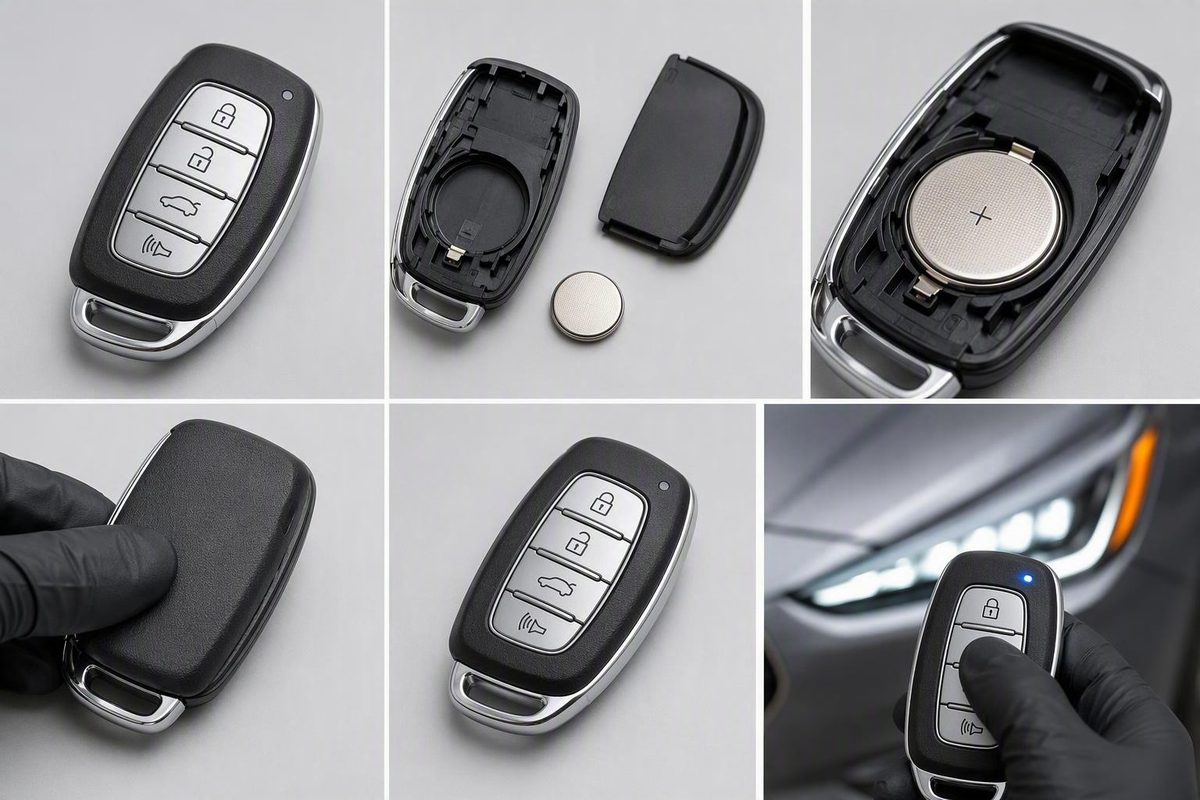
Identify the fob design, match the old coin cell’s full code and orientation, install it safely, then test every supported function.
For a Hyundai Sonata key fob battery replacement, do not choose a battery from the vehicle’s model year alone. CR2032 is common in Hyundai fobs, but it is not universal. Identify how your particular fob opens, read the complete code on the installed coin cell, photograph its orientation, and install an exact match. This is a design-based procedure because Sonata fob cases, batteries, and polarity are not verified here by model year.
Quick answer: verify the battery before opening or buying
If the owner’s manual for your exact Sonata and fob specifies the battery, you can verify it before opening the case. Otherwise, open the fob safely before buying and match the code printed on the old cell.
Many Hyundai fobs use a CR2032, while some may use CR2025 or CR2016 cells. Those possibilities do not establish what is inside your Sonata fob. The replacement should match the complete battery code on the installed cell, not merely its diameter or appearance. General Hyundai battery guidance likewise recommends using the exact original battery type.
Depending on the case, the opening tool may be:
- The removable emergency key
- A coin
- A small flathead screwdriver
Prepare:
- An exact-match replacement cell—or wait to purchase one until you have read the old cell
- A clean, well-lit work surface
- A phone camera
- The opening tool appropriate for the case
Work over a clear tabletop so that the battery and any loose case components remain visible.
Identify the fob design before applying pressure
Inspect the fob in your hand rather than assigning an opening method by Sonata model year. The following are two common Hyundai designs, not a complete classification.
| Common visible design | What to inspect | Opening approach |
|---|---|---|
| Smart fob with a removable metal key | Find the release tab, remove the key, and look in the exposed area for a designated slot | Insert the emergency key in that slot and twist gently |
| Remote with a formed edge notch | Look around the shell for a clearly defined opening notch | Use a coin or small flathead screwdriver at the notch |
If your fob does not match either description, stop and locate the instructions for that exact remote. Do not test random seams.
Use only a designated slot or notch. Keep a screwdriver pointed away from your hand, and do not drive it toward the electronics in the middle of the case. If the shell does not begin separating under light, controlled pressure, reassess the opening point rather than forcing it. These opening methods and the tool-injury precaution are described in a third-party Hyundai fob procedure.
Replace the battery step by step
-
Remove the emergency key, if fitted. Press or slide the release control while pulling out the metal key. Set it beside the fob.
-
Open the case at the intended point. Insert the emergency key into the designated slot and twist gently, or use a coin or small flathead screwdriver at the formed edge notch.
-
Separate the shell over your work surface. Apply pressure at the case edge without scraping the circuit board, bending battery contacts, or dislodging the button pad. If reaching the battery appears to require removing or disturbing electronic components, stop and find instructions for the exact fob.
-
Photograph the battery before removing it. Capture the full printed code, the visible face of the cell, and any
+or−markings inside the case. -
Remove the old coin cell carefully. Release it from its retaining edge or tabs without levering against nearby components.
-
Verify the replacement. Match the complete code printed on the old cell. Similar-looking coin cells may have different codes and thicknesses.
-
Install the new battery in the recorded orientation. Follow the case’s polarity markings when present. Do not assume the positive side always faces up or outward; orientation can differ by fob design.
-
Check the fit and contacts. The cell should sit flat, remain securely retained, and touch the electrical contacts. Do not bend a contact unnecessarily.
-
Close the shell evenly. Align the buttons and both case halves, then press around the perimeter until the clips engage and the seam closes without gaps.
-
Reinstall the emergency key. Make sure it locks in place and that every exterior button presses and returns normally.
If the case will not close, do not clamp or force it. Reopen it and check for a battery sitting above its retaining tab, a shifted button pad, or another misaligned internal piece.
Test every function after reassembly
Begin by testing lock and unlock from a few feet away, then increase the distance. See the Hyundai key-detection troubleshooting guide.
Test only functions supported by your vehicle and fob:
- Trunk release
- Panic button
- Proximity entry
- Push-button starting
- Any other original remote button
Also inspect the physical assembly. The shell should be fully closed, the emergency key should be secure, and each button should move normally.
Reduced range, repeated button presses, intermittent operation, a dashboard key-battery warning, or failed proximity entry can indicate a weak fob battery. They are clues rather than proof because contact problems, interference, worn controls, or other faults can cause similar behavior.
A routine coin-cell replacement should not automatically be treated as a reprogramming job. General key-fob guidance says most fobs do not require reprogramming after a battery change, although any resynchronization procedure can vary by vehicle. Consult the exact Sonata manual before attempting one. Do not use a generic ignition or button sequence that was written for another model or ignition system.
If the fob still does not work: use this diagnostic order
Reopen the fob and repeat the installation checks in order: battery code, orientation, seating, electrical contact, and case alignment. If available, try a second fresh cell bearing the same exact code.
Inspect the battery contacts without dismantling the electronics. Look for dirt, corrosion, a tab bent away from the cell, or a contact trapped beneath it. Do not scrape components or attempt circuit-board or solder repairs unless you are qualified to work on small electronics.
| Symptom | Next check | Possible explanation |
|---|---|---|
| No response from any button | Recheck the installation; try another exact-match cell | Wrong or depleted cell, poor contact, case misalignment, worn buttons, fob damage, pairing, or receiver issue |
| Intermittent response or short range | Test nearby and then in another location | Battery or contact problem, or signal interference |
| Remote buttons fail but backup start works | Recheck the coin cell and compare with a spare fob | Remote-power, button, electronics, or pairing problem |
| Dashboard powers up but engine will not crank | Move beyond fob-only checks and test vehicle power | Possible 12-volt battery, connection, or starting-system problem |
If you have a spare fob, test it under the same conditions. If the spare works, the problem is more likely confined to the first remote. If both fail, vehicle-side reception or interference deserves investigation, although both fob batteries could also be weak.
Move to another location if operation is intermittent. Signal interference, worn buttons, moisture or circuit damage, lost pairing, and a vehicle-receiver fault are possibilities rather than diagnoses. Persistent failure after the basic checks and spare-fob comparison calls for model-specific documentation or professional testing. A Hyundai dealership troubleshooting overview discusses these potential fob- and vehicle-side causes.
Dead-fob access, backup starting, and no-start problems
Many Hyundai fobs contain a hidden metal key that may provide manual access through the driver’s door.
For an applicable push-button-start Sonata, press the brake and hold the fob near or against the start button while attempting to start the vehicle. The precise emergency-entry and backup-start procedures vary, so confirm them in the model-specific manual. Generic Hyundai guidance describes both the hidden key and holding a weak or dead fob near the start button as possible backup measures. Review the applicable procedure before trying it.
Successful backup starting does not establish that the replacement coin cell or the remote buttons are working. Locking, unlocking, trunk release, and proximity entry can remain inoperative even when the vehicle recognizes the fob during a backup-start attempt.
Distinguish “key not detected” from an engine no-crank condition. If the dashboard and accessories power up but the engine will not crank, the vehicle’s 12-volt battery and its connections are possible causes to test—not confirmed diagnoses. A reported Sonata case involving these symptoms likewise recommended testing vehicle-battery power and connections rather than continuing to treat the fob as the only suspect. See the qualified no-start discussion.
Does replacing a Hyundai Sonata key-fob battery require reprogramming?
Not automatically. Complete the installation checks first. If the fob remains unresponsive, use the procedure documented for the exact Sonata and fob rather than a generic “ACC and unlock” sequence.
Why does my Sonata start when I hold the fob against the start button, but the remote buttons do not work?
A successful backup start does not prove that the coin cell or remote-button functions work. Recheck the installation and compare the result with a spare fob if available. Continued failure may involve the buttons, fob electronics, contacts, or pairing.
When should I contact a locksmith or Hyundai service department?
Seek qualified help when a second exact-match battery fails, the case or contacts are damaged, moisture has entered the fob, the spare-fob comparison suggests a vehicle-side issue, or model-specific pairing may be necessary. Request vehicle diagnosis instead of more fob work if the engine will not crank.
The decision rule is simple: identify the shell, read the old battery code, preserve its orientation, install an exact replacement, and test every supported function. If a second fresh cell and spare-fob comparison do not solve the problem—or the engine will not crank—consult the model-specific manual or seek qualified diagnosis.